

Improved Search in Your Media Library
TE has upgraded the search functionality across your media library to help you find content more easily and accurately. In addition to the media library, these behaviors also apply when searching for emails in journey components.
Here's what you can expect.
What Changed
More Results, Better Ranking
You will see more search results than before. The improved search looks for your search terms in more places (like descriptions, tags, email subject lines, and reference numbers) and finds word variations you might have missed. The results are ranked by relevance with the best matches appearing first.
New Sorting Options
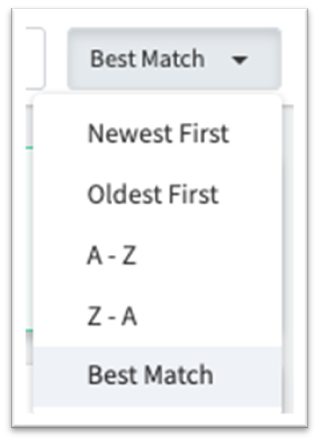
When you search, results automatically sort by "Best Match" to show the most relevant content first. You can change this using the sorting drop-down list to view results by Newest First, Oldest First, A - Z, or Z - A—giving you full control over how results are displayed.
Flexible Search Terms
- Order does not matter - Searching "summer newsletter" and "newsletter summer" return identical results
- Multiple keywords work better - Use several terms to close in on exactly what you need
- Case does not matter - "Newsletter" and "newsletter" return identical results
Exact Phrase Matching with Quotes
You can now search for exact phrases by wrapping your search terms in either single or double quotation marks (either 'sample query' or "sample query"). This is especially helpful when looking for content with specific names or phrases. Additional terms outside the quotation marks are also searched, but prioritized in the result list lower than the quoted terms.
How Search Ranking Works: Prioritization
Results are ranked by relevance based on where your search terms appear:
- Higher Priority - Content names, then email subject lines are weighted most heavily, because they typically contain the most descriptive information about a piece of content.
- Medium Priority - Descriptions are prioritized next, because they provide important context and help surface relevant content.
- Lower Priority - Tags and reference numbers are also searchable and can help you find content, though they're weighted less in determining relevance.
Best Practices
- Use specific keywords for the most relevant results.
- Add multiple search terms to narrow down results.
- Check your tags—content may be findable through tags even if the name does not match.
- Trust the ranking—the most relevant content appears first.
For Administrators Sharing Content
If you are sharing search result URLs to promote specific content to your users, be aware that search results may now include more items than before. Consider organizing content into folders, and filtering by that folder (rather than using the text search bar). Then share the folder filter URL instead. This ensures that users see exactly the curated content you intend to promote.