

This month’s updates focus on three big themes: making consent and compliance easier to manage at scale, modernizing your LOS connectivity, and giving admins more visibility into how teams are engaging through Engage SMS.
👉 Help us understand how we can better support your rollout preparations by taking a quick, 30-second survey on which resources are most helpful to you!
Customer IQ | Consent
Why it matters
Consent helps you confidently activate your engagement only when the appropriate permissions are in place. Instead of manually checking multiple systems, a Journey can automatically check for customer consent before passing a prospect to the AI Sales Assistant for outreach, so you can confidently scale voice- and AI-driven engagement while staying aligned with regulatory expectations.
What’s new
Using new EAPI endpoints, Total Expert can now aggregate standard consent data points from ecosystem partners and store them on the contact record. This creates a point-in-time historical ledger of consent changes and will serve as the foundation for aggregating consent for all the channels of engagement. This latest update also introduces a new Journey condition to check for Voice AI consent.
Availability
- Audience: Admins
- Status: Live
How to get started
Clients should work with your CSM and implementation team to configure consent data ingestion from your ecosystem partners and update Journey logic to reference the new Voice AI consent condition.
Integrations | Fusion Integration Platform & Encompass
Why it matters
As ICE Mortgage Technology retires its Encompass SDK, lenders need a more modern, resilient way to connect LOS data to Total Expert. Fusion provides a real-time, more transparent integration layer that preserves key workflows (like SMS opt-ins) while setting you up for future extensibility.
What’s new
Fusion is Total Expert’s new LOS integration platform that maintains real-time sync, supports SMS opt-ins, and offers greater flexibility and transparency than the legacy Encompass SDK connection. It will now be used to connect clients to Encompass, with the first customer upgrading in January. It will also serve as the integration platform for connecting Dark Matter’s Empower LOS.
Availability
- Audience: Admins and technical teams using the Encompass NextGen integration
- Status: Live for clients using Encompass NextGen
How to get started
Reach out to your CSM to review your current Encompass integration, understand migration steps to Fusion, and plan your cutover before the SDK retirement in December 2026.
🔗 Fusion: Encompass Feature and Configuration Guide
Content | Library Search Enhancement
Why it matters
The ability to quickly find the right content is crucial to maximizing the effectiveness of your marketing efforts. With the latest enhancement to the content library search algorithm, we’re improving content discoverability across the platform. The enhanced search now queries multiple content attributes, so users can easily find relevant assets even when search terms don’t match the asset title directly.
What’s new
The new search algorithm increases relevance by returning more comprehensive results that better align with a user’s search intent. This allows for more efficient content discovery by surfacing assets that match any part of the asset (name, email subject line, description, reference number, or tag), not just the asset title. The result is a more intuitive and streamlined experience that reduces the time users spend searching for the right materials.
Availability
- Audience: All users accessing the Total Expert content library
- Status: Live
How to get started
The enhanced search experience is automatically available. Any additional questions can be directed to your CSM.
🔗 Learn more about Enhanced Content Search
Salesforce Integration | Bi-Directional Contact Sync
Why it matters
Total Expert for Salesforce clients can now enjoy seamless contact data flow between Total Expert and Salesforce, ensuring that contacts created or updated in Total Expert automatically sync with their Salesforce instance. This bi-directional sync enhances efficiency, eliminates data silos, and ensures that teams always work with the most up-to-date contact information.
What’s new
- In Salesforce, Admins can configure data mapping for contacts created within Total Expert and define field-level data flow direction to ensure updates are reflected in Salesforce in real time.
- In Total Expert, loan officers can leverage single-property sites and lead-capture apps, as contacts created through those channels will be synced to Salesforce, ensuring data consistency across platforms.
Availability
- Audience: TE4SF users, including Retail Loan Officers, Loan Officer Assistants, Marketing Managers, Branch/Sales Managers, and Marketing Specialists.
- Status: Live for clients using the Total Expert for Salesforce integration.
How to get started
Admins can set up field-level data mapping from within the Salesforce Setup page. For more details on configuring contact sync and field-level direction, reach out to your CSM or check out the support documentation.
🔗 Total Expert for Salesforce 6.0 Installation Guide
Salesforce Integration | Send Total Expert Emails Directly from Salesforce
Why it matters
Salesforce users can now stay in their daily Salesforce workflows while leveraging marketing‑approved email templates, co‑branded emails, and compliant tracking from Total Expert. This update increases efficiency and improves consistency across every email touchpoint.
What’s new
From within Salesforce, users will be able to:
- Browse, search, and preview Total Expert email templates (including co‑branded versions) on synced objects like Leads and Contacts.
- Select a template and send to one or many recipients with variables automatically populated from mapped Salesforce fields.
- Customize content before sending (subject line, preheader, body text) and embed rich media such as BombBomb videos.
- Choose a “send on behalf of” sender, enabling assistants to send emails on behalf of loan officers while maintaining accurate attribution in Total Expert.
- Include co‑marketing partners and see that activity recorded in the Salesforce contact record.
Availability
- Audience: TE4SF users, including Retail Loan Officers, Loan Officer Assistants, Marketing Managers, Branch/Sales Managers, and Marketing Specialists.
- Status: Live for clients using the Total Expert for Salesforce integration.
How to get started
Total Expert for Salesforce admins will configure OAuth to Total Expert, add the new email component to key record pages (Lead, Contact, Opportunity, and relevant custom objects), and confirm field mappings for personalization.
🔗 Total Expert for Salesforce 6.0 Installation Guide
AI Sales Assistant | Warm Transfer Functionality
Why it matters
To further enhance the AI Sales Assistant's capabilities and provide a more seamless and human-like experience, we’ve rolled out the Warm Transfer feature. This improvement allows the AI Sales Assistant to facilitate a 3-way call with both the loan officer (LO) and the prospect. After the call is established, the AI Sales Assistant will drop from the conversation, leaving the LO and the prospect to continue the discussion uninterrupted.
What’s new
The Warm Transfer functionality changes the current live transfer process. This update ensures that the AI Sales Assistant remains on the call for a moment to provide a proper introduction before stepping away, leaving the LO and prospect to continue the process. This will create a more natural flow for the LO and the lead, providing a more polished, professional experience.
Availability
- Audience: Organizations using AI Sales Assistant for live transfers
- Status: Live
How to get started
AI Sales Assistant clients should work with their implementation team to activate Warm Transfer for their individual use cases.
Engage SMS | User Level Reporting
Why it matters
Knowing which users are leveraging SMS helps you coach to best practices, identify power users, and prove ROI on Engage SMS across teams.
What’s new
Admins can now request custom reports that provide user-specific metrics on Engage SMS utilization and segment usage. This unlocks more granular visibility into adoption and performance at the individual user level.
Availability
- Audience: Admins
- Status: Live via custom report request
How to get started
Submit a custom reporting request through your usual Total Expert support or CSM channel, specifying the user-level Engage SMS report.
🔗 Engage SMS Data Dictionary - This reference document can help translate the report.
📌 Please note: We are working on enabling this data in-platform so it can be accessed directly.
Security | Password Lockout + Admin Unlock
Why it matters
Stronger login protections help safeguard your organization from brute-force attacks and unauthorized access, while still giving your internal team a fast path to get users back into the platform when there’s an issue.
What’s new
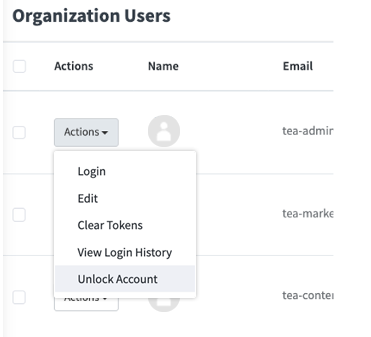
Total Expert will begin locking user access after multiple failed login attempts, both in the platform and in the mobile app. When a user exceeds the allowed number of attempts, their account is temporarily locked. Admins can unlock accounts directly from the admin experience.
Availability
- Audience: Admins and End-Users for organizations not utilizing SSO
- Status: This will be generally available over the next month and enabled in your org’s security settings
How to get started
Ensure users are informed of the upcoming changes. Once available, work with your internal security owner and CSM to confirm your lockout thresholds and enable the setting for your organization. When configured, admins can manage locked accounts from the user management area.
Expert Content | New Door Hanger, Yard Sign & Sign Rider Templates
Why it matters
These new templates give loan officers and their partners a faster, more consistent way to produce on-brand print assets, while still giving marketing full control over branding, compliance, and co-branding rules.
What’s new
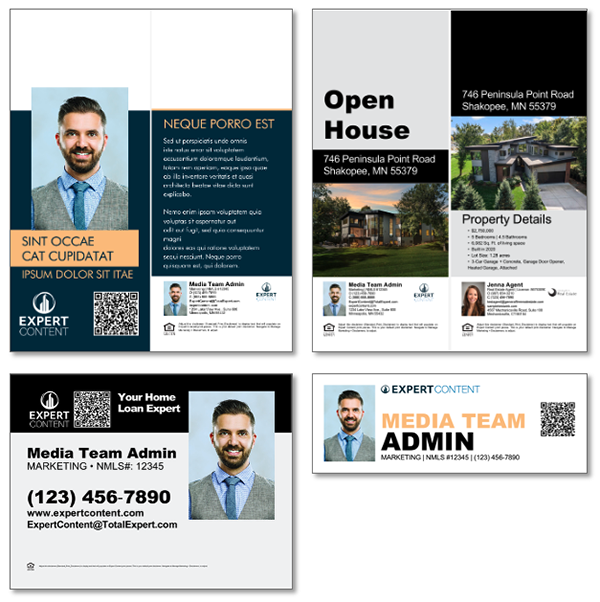
Expert Content has added new, admin-configurable print templates:
- Door hanger layout templates: single-brand and co-branded options with MLS-integrated versions available.
- Admin controls: turn on/off editability for text/copy, imagery, logos/colors, and QR codes so LOs can personalize while preserving brand standards.
- MLS-integrated, co-branded assets: pull in property data automatically, then edit as needed. Users can change titles from “Open House” to “Just Sold,” “Just Listed,” or other campaign-specific messaging and override property details or imagery when appropriate.
- Yard sign templates: available as both blank canvases and structured layouts.
- Sign rider templates: blank and layout-based options to support “For Sale,” “Pending,” “Sold,” or campaign-specific riders.
Availability
- Audience: Marketing admins and loan officers using Expert Content
- Status: Available in the print asset library once enabled for your org
How to get started
Marketing admins should configure the new templates in Expert Content, set default branding and MLS/QR settings, and decide which elements are editable vs. locked. Once published, share guidance with LOs and partners on when to use door hangers vs. yard signs vs. riders, and how to customize titles and property details while staying on brand.
🔗 Expert Content: Self-Serve Templates Strategy Guide
🔗 Expert Content: MLS Listing & Mortgage Rate Assets Strategy Guide
Mobile App | Latest Enhancements
What’s New
- Clear loading state for long threads: The mobile app now shows a banner when long conversations are still loading, so users know the app is working and hasn’t frozen.
- Special characters display correctly: Notes now show apostrophes, ampersands, and quotation marks as expected—whether they’re created on web or mobile.
- Back navigation behaves as expected: Going back from the Send Message screen returns you to the contact details page instead of the home screen.
- Cleaner task notes: Task descriptions now keep their intended line breaks, rather than displaying <br/> tags.
Availability
- Audience: End users on the mobile app
- Status: Live for Engage SMS Clients with Mobile App
How to get started
Encourage users to update to the latest version of the Total Expert mobile app to take advantage of the improved experience.
Together, these January updates strengthen the core of your customer engagement engine, making it easier to stay compliant, modernize your LOS connectivity, target enablement by role, and re-engage past borrowers at scale. If you’d like help turning any of these capabilities on or folding them into your workflows, reach out to your CSM or visit the Knowledge Base for enablement resources. We’ll be back next month with more updates as we continue to help you orchestrate the perfect customer journey and win customers for life.