

March’s release continues to build on the momentum of February, with ongoing investment in Lead Management alongside a broad set of improvements across mobile security, image management, integrations, content tools, and platform reliability. Together, these updates reduce friction, improve consistency, and help teams stay focused on the work that drives outcomes.
Reporting Center
Why it matters
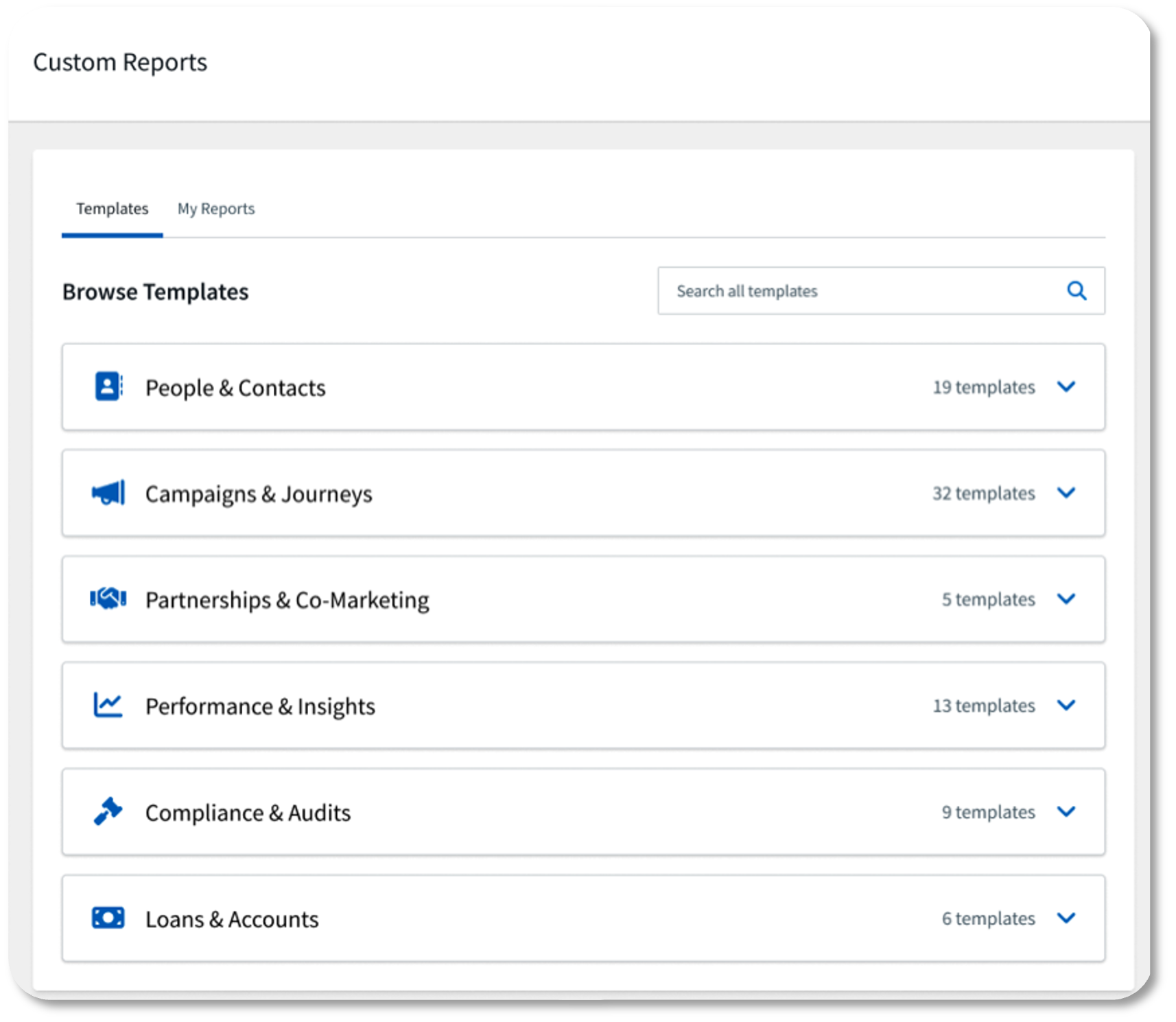
Introduced in the February release, Reporting Center is now fully available to all admins. No more waiting on a report request or relying on a data team. Reporting Center improves admin visibility, enables data-driven planning, and strengthens performance insights by giving teams direct, self-service access to the data that matters most. Other commonly requested reports will be added in the coming months.
What’s new
- Improved user experience: A more intuitive interface makes it easier for admins to find, run, and act on reports without additional support.
- Admin-level reporting access: Admins now have direct access to key reports covering audits, journeys, and contact data, all in one place, without needing to submit a request.
Availability
- Audience: Admins who manage data, reporting, and governance
- Status: Generally Available
How to get started
Reporting Center is automatically enabled for Admins at time of release.
Lead Management Updates
Why it matters
Lead Management is one of Total Expert’s most significant areas of investment, and this release reflects that continued commitment. With more enhancements planned throughout 2026, each update makes it easier for teams to capture, route, and convert opportunities with less manual effort and greater consistency.
What’s new
- External API for lead aggregation: Bring leads in from any source through a standardized API, enabling lenders to centralize leads from third-party vendors, websites, and other external systems directly into Total Expert.
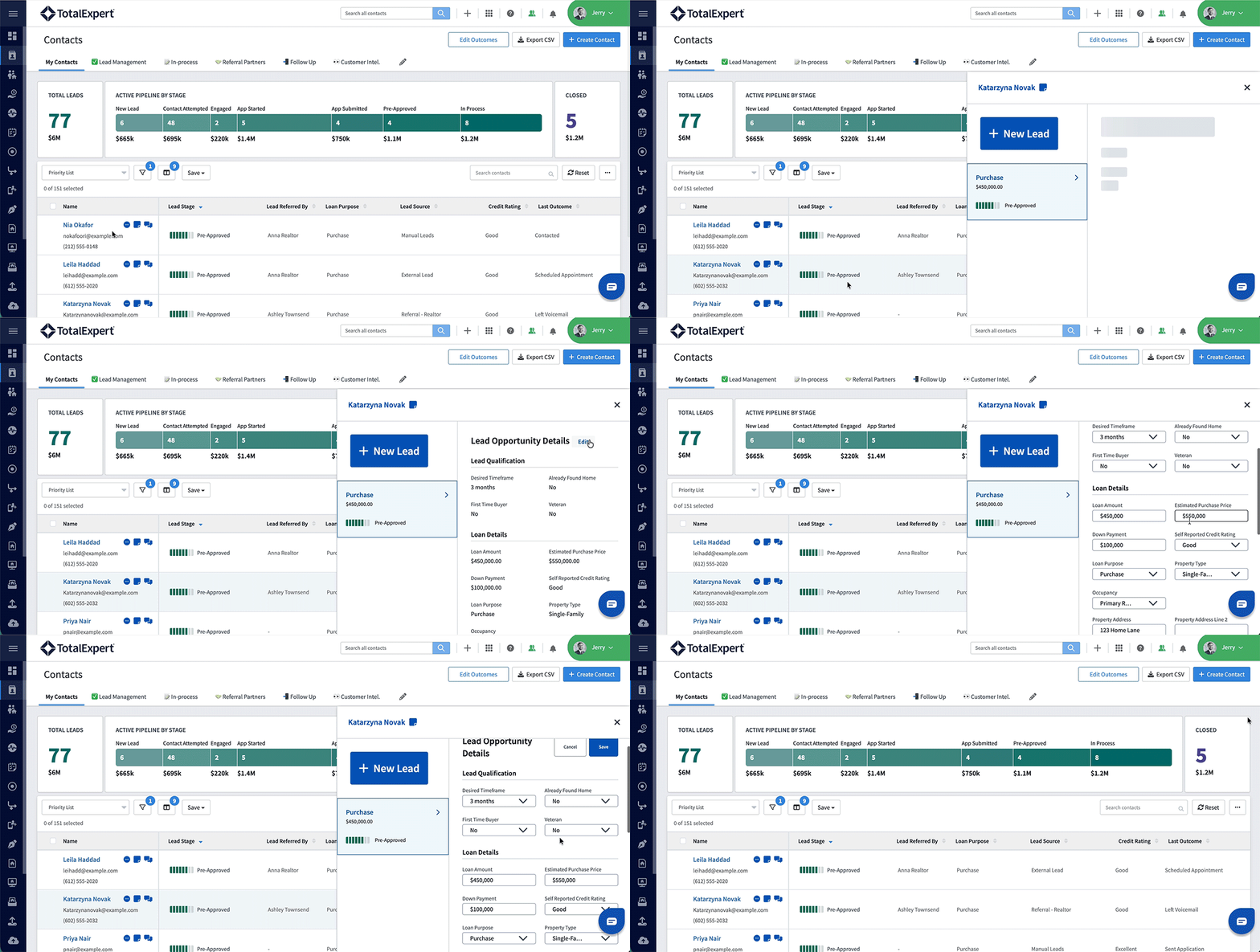
- Flyout Panel: A new details panel opens directly from Pipeline Views when a user selects a contact, surfacing all of that contact’s lead opportunities without navigating away from the list. The panel displays key lead information including lead stage, purpose, loan amount, qualification details, and loan details, and allows users to update lead stage, log an outcome, add a note, create a new lead, or delete an existing lead without leaving their current list. The panel updates in real time after any action and stays open as users click between contacts, making it significantly faster to triage and work large lead lists.
- Send from lead assignee: Journey builders and admins can now configure email and SMS communications to send from the user assigned to a lead rather than the contact owner. This is particularly valuable for contacts held under a holding account, where the assigned loan officer should be the one making contact. The option is available on Send Email, Send Scheduled Email, and Send SMS operators when a journey is triggered by a Lead Created, Lead Stage Change, or Lead Update event.
- Routing policy updates: Enhanced routing controls give admins more flexibility to define how and when leads are distributed, supporting more sophisticated assignment logic across teams. This includes a new State License Matching filter that restricts lead assignment to only users who are licensed in the property’s state on the lead, helping organizations route leads compliantly and predictably. Note: In its current state, this filter applies to imported leads. Leads created manually may not include a property state, which would exclude all users from routing eligibility if the filter is applied.
- Routing policy UI improvements: A series of accessibility and usability refinements have been applied to the routing policy experience, including improved color contrast for status indicators, cleaner button styling, tighter label alignment in the Edit Filters panel, and more consistent tooltip positioning on routing nodes.
- View and edit property address on a lead: Users can now view and update the property address directly within the Lead details view, under the Loan Details section. All address fields are optional and editable individually, with the state field using a validated dropdown and zip code supporting standard 5-digit and 5+4 formats. Updating a lead’s property address does not affect the associated contact’s address.
- Non-admin lead reassignment: Loan Officers, Loan Officer Assistants, and Sales Managers can now assign or reassign leads they have edit access to, without requiring admin involvement. This gives teams the flexibility to redistribute work based on capacity, expertise, or referral relationships. Reassignments are reflected immediately in both the lead details view and Pipeline Views.
- Improved lead activity accuracy: The lead activity trail now correctly distinguishes between leads matched to an existing contact and leads that resulted in a new contact being created. Previously both events used the same note type, making it harder to understand exactly what happened when a lead was imported or processed.
Availability
- Audience: Retail Mortgage, Loan Officers and teams that support LO workflows
- Status: Generally Available for clients with Lead Management enabled
How to get started
Work with your Customer Success Manager (CSM) to enable Lead Management for your organization, including the implementation services package required.
- Knowledge Base
- Lead Management Webinar
- Pipeline Views Playbook
- Campaign Builder Playbook
- Journey Playbook
- Expert Academy: Lead Management for Admins - March 17, 2026
- Expert Academy: Lead Management for Loan Officers – March 24, 2026
- Loan Officer Experience Video
Global & User Image Library Updates
Why it matters
Managing a large image library should not require repetitive manual tasks. These updates eliminate common friction points for marketing admins, improve asset management efficiency, and align the image management experience with user expectations.
What’s new
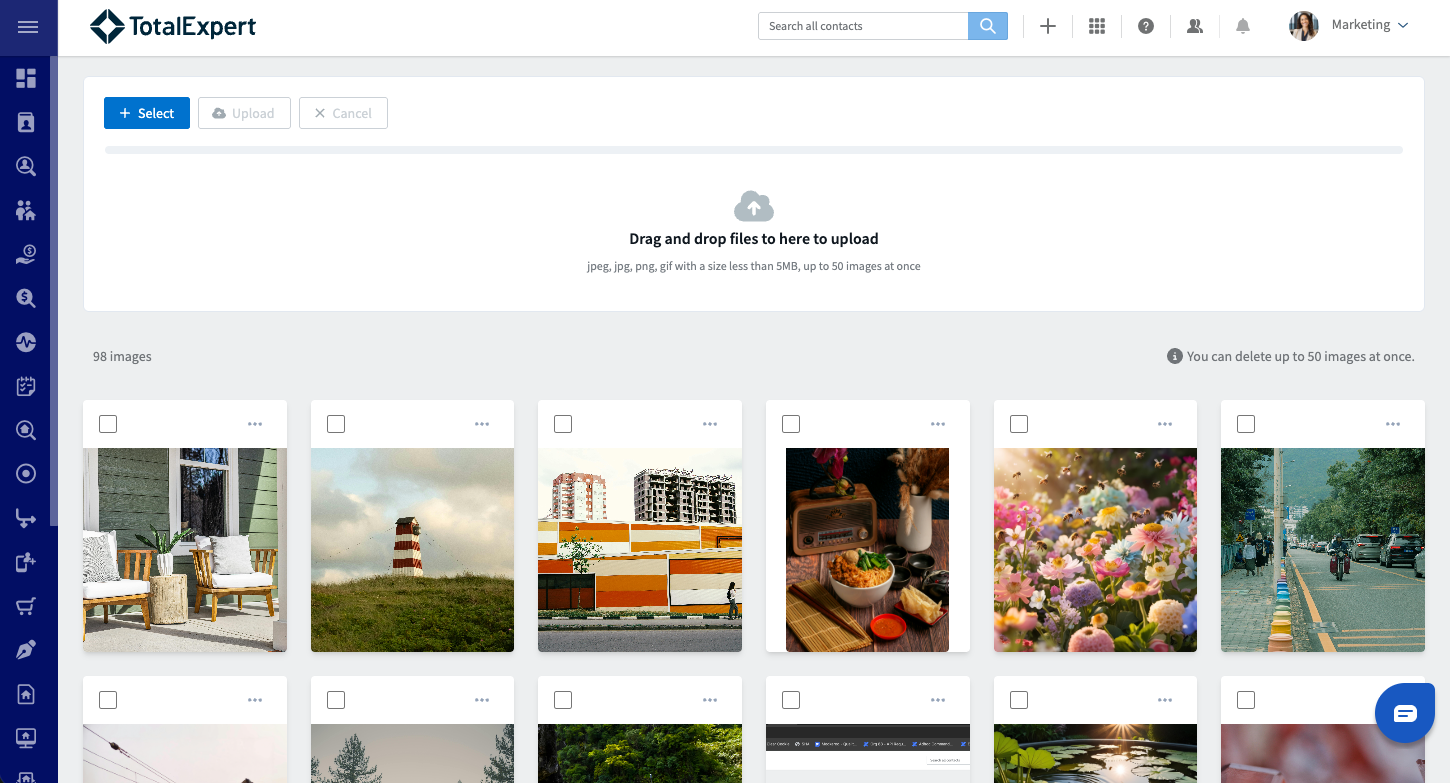
- Bulk upload: Upload 1–50 images per batch, significantly reducing the time spent adding new assets to the library.
- Bulk delete: Remove multiple images at once, making it easier to keep the library clean and current.
- Drag-and-drop upload support: A more intuitive upload experience that fits naturally into existing workflows.
- Clear validation and error messaging: Users receive immediate, actionable feedback when uploads do not meet requirements, reducing confusion and retry loops.
Availability
- Audience: Global Image Library users and User Image Library users
- Status: Generally Available
How to get started
All updates are available in the Image Library upon release with no configuration required.
Mobile Login Enhancements: Authentication Updates
Why it matters
Coming later in March, these authentication updates provide users with a smoother sign-in experience while giving organizations greater control over session management and security. Logging into the mobile app should be fast, secure, and friction-free.
What’s new
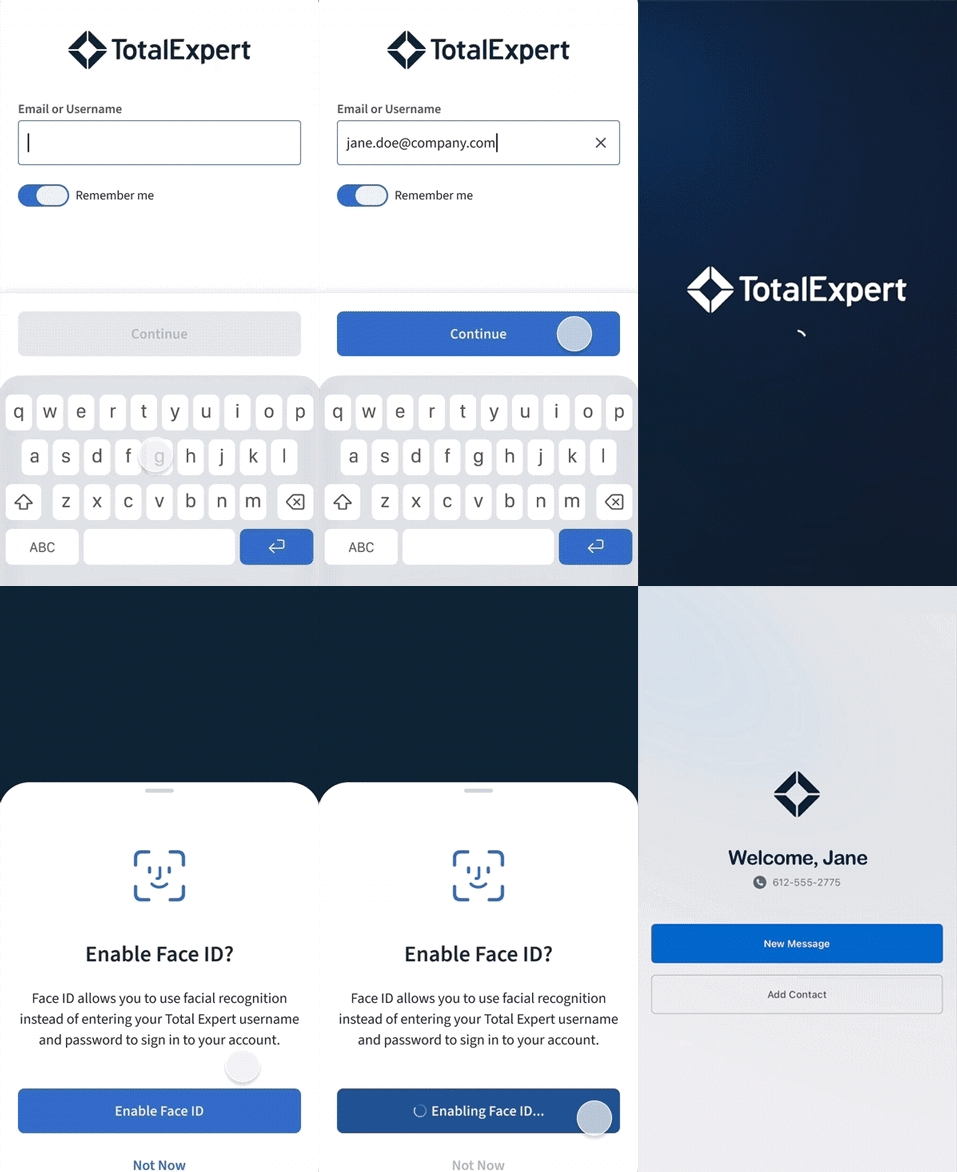
- Remember Me stores email only: Balances convenience with security by remembering a user’s email address without storing credentials.
- Biometric support for SSO users: SSO-enabled organizations can now offer Face ID and Touch ID as login options, reducing friction for daily users.
- Session timeout managed via org setting: Admins can configure session duration at the organization level, giving security teams the control they need.
- Password lockout: For clients not using SSO, accounts will be locked out after multiple failed login attempts, preventing brute-force attacks on the mobile app. Admins can restore access for users who get locked out. (Currently available. See the Knowledge Base for more information on lockouts.)
Availability
- Audience: Mobile clients. Admin configuration required.
- Status: Generally Available late March 2026
How to get started
Admins should review org-level session timeout settings before release. Users will need to update to the latest version of the mobile app.
Outbound Data Connector (ODC) Enhancements
Why it matters
Outbound Data Connectors (ODCs) are used widely across the platform to allow customers and partners to have API requests interact with third-party platforms. These enhancements address known gaps in visibility, usability, and reliability that have created friction for users relying on ODCs in their day-to-day workflows.
What’s new
- Loan ODC activity on the primary contact: When a loan ODC is initiated from a Journey, the activity is now visible in the contact activity feed of the primary borrower on that loan, giving users a complete view of what has happened without needing to look elsewhere.
- View ODC setup without disabling: Users with view and write access can now review ODC configuration without having to turn it off first, reducing the risk of accidental disruption to active workflows.
- Bulk trigger from multi-select action menu: Contact and loan ODCs can now be initiated directly from the multi-select action menu on contact and loan records, expanding on the existing ability to trigger ODCs from individual records under the Actions tab.
- ODC log visibility: Receive more details around ODC actions, including a running history of ODC actions, including which ODC, what was sent, and the outcome.
Availability
- Audience: Retail Loan Officers, Loan Officer Assistants, Marketing Managers, Branch Managers, Sales Managers, and Marketing Specialists
- Status: Generally Available late March 2026
How to get started
All features are available upon release. ODC log access requires the appropriate permission to be enabled.
Expert Content
Why it matters
Expert Content provides ongoing value by giving marketing teams and loan officers ready-to-deploy assets that keep them in front of consumers at the right moments, from the earliest stages of a loan to post-close relationship nurturing.
What’s new
- EPN Journey for Covered: Triggers upon loan creation (purchase or refinance) and delivers personalized insurance quotes based on loan purpose and property type, helping borrowers explore home insurance options early and ensuring proof of insurance is secured before closing.
- CI: EPO Risk Mitigation Journey: An operational journey designed to identify competitive shopping activity during the early payoff (EPO) period. Once a loan is funded, the journey monitors for Customer Intelligence Rate or Credit Inquiry signals and notifies the contact owner when early payoff risk is detected. Customers interested in this journey should connect with their Total Expert representative to have it copied into their library.
- Servicing Sold: This operational journey automatically silences communications to borrowers when their loan servicing has been transferred to another organization. If a new loan is created or funded for the borrower, the journey will automatically remove the silence and resume communication. An optional path ensures birthday messages can still be delivered.
Availability
- Audience: Marketing admins and Loan Officers using Expert Content
- Status: Available as part of the current quarterly Expert Content plan
How to get started
Small Changes. Big Impact.
Why it matters
The following are smaller, high-impact improvements and fixes driven directly by customer and internal feedback. They improve the day-to-day experience, remove friction, and increase reliability across key areas.
What’s new
- Mobile App
- Automated app update prompts: The mobile app now automatically prompts users to update when their version falls behind, replacing a previously manual process. Users who are one major version behind will be required to update. For minor and patch versions, users receive a reminder after falling 3 versions behind and are required to update at 4 or more versions behind. This ensures users stay current as mobile releases become more frequent, with less manual effort from internal teams.
- Integrations
- Polly integration improvements: Several updates have been made to improve the reliability and accuracy of the Polly pricing integration. Upfront fees for government loans are now fetched, displayed, and included in all calculations. The system also correctly identifies government loans and skips the MI endpoint call where it does not apply. Additionally, net price is now fetched and displayed alongside the existing price value, giving customers the flexibility to choose which figure to use in their workflows.
- Total Expert for Salesforce 6.5: This update includes several improvements to the TE4SF integration. Email activity previews are now included in the Activities API, giving Salesforce users better visibility into email interactions directly within their Salesforce records. Contact-related user mapping has been updated to improve data accuracy between Total Expert and Salesforce, and the data mapping UI has been refined for a cleaner, more consistent experience. Additionally, .wav audio recordings are now displayable within Salesforce activity records.
- Campaigns
- Bulk SMS opt-in requests: Users can send Engage SMS opt-in requests to multiple contacts at once directly from the contact screen, without using a Journey. Teams that have not yet taken advantage of it should contact their CSM to confirm it is enabled for their organization.
- Co-Marketing Partner journey conditions: Coming later in March, journey builders will be able to use Co-Marketing Partner status as a journey condition and trigger journeys when a Co-Marketing Partner accepts an invite. This gives teams an opportunity to leverage journeys based on partner relationship status, opening up new automation possibilities around partner onboarding and engagement.
- Content
- Email menu label consistency: Menu items and navigation labels related to email have been standardized across the platform for a more consistent experience. Previously, the same destination was labeled differently depending on where you accessed it, with variations appearing across Global Navigation, the Contact List, Contact Records, and Loans. These inconsistencies have been resolved so users can navigate with confidence regardless of where they start.
Together, these March updates mark an important step forward for Total Expert and the teams that rely on it every day. Lead Management continues to grow with each release, making it faster to work leads, route opportunities, and take action without slowing down. Alongside that, improvements across mobile security, image management, content tools, integrations, and platform reliability continue to remove the friction that gets in the way of great execution. If you want help enabling any of these features or folding them into your workflows, reach out to your CSM or visit the Knowledge Base for additional resources. We’ll be back next month with more updates as we continue to help you build more connected, intelligent customer journeys.