

More deals, less friction. April's release is built for originator productivity. Lead Management, mobile capabilities, and platform intelligence. Each update is built on helping teams work more efficiently, route opportunities more effectively, and access the information they need without friction..
Lead Management Updates
Why it matters
Lead Management continues to be one of Total Expert’s most significant areas of investment. We are executing on planned enhancements AND adapting to feedback from current users! This release includes updates to routing controls, journey targeting, and pipeline visibility; making it faster and easier to capture, route, and convert opportunities.
What’s new
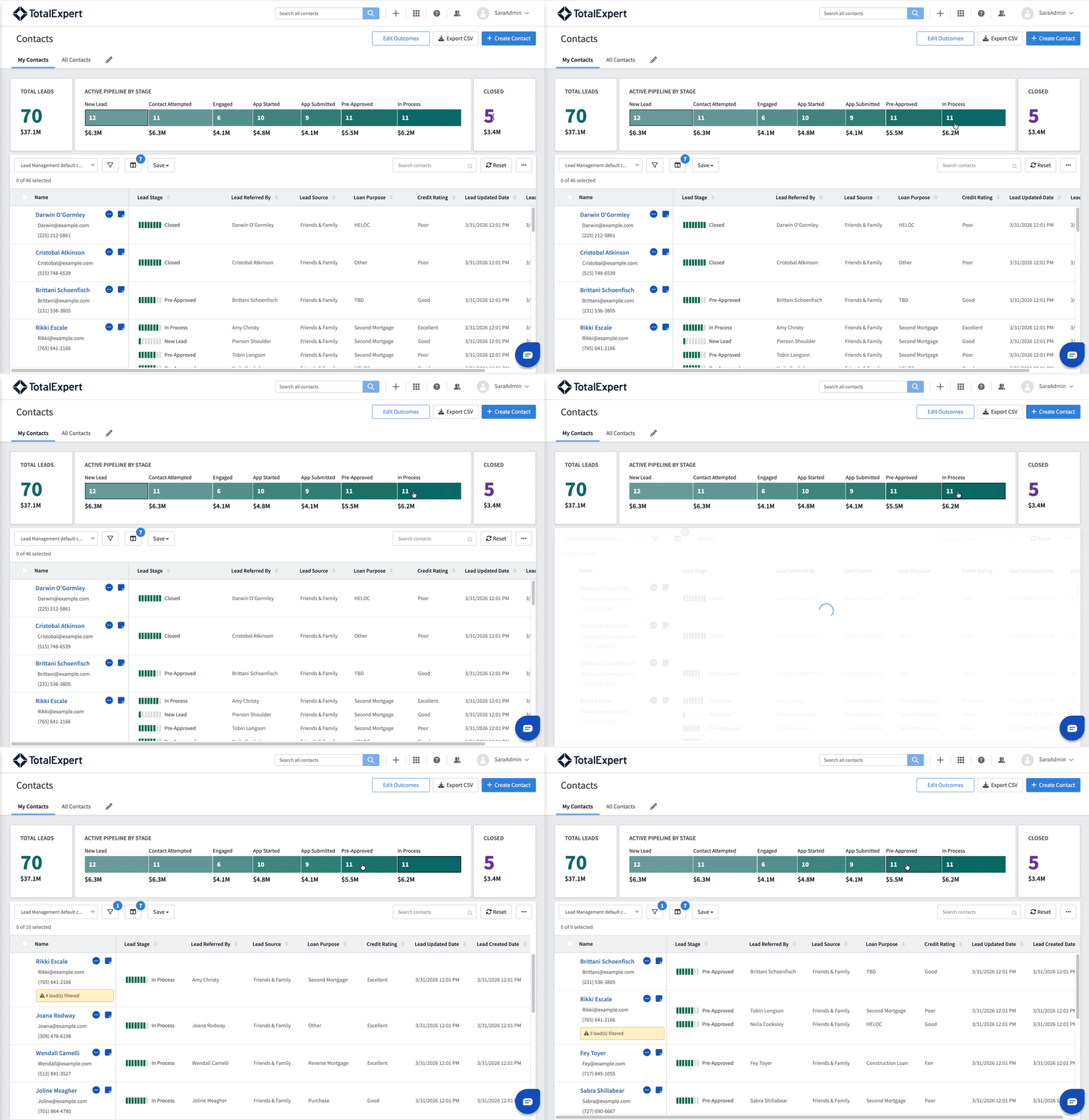
- Property Zip Code routing filter: Admins can now configure routing policies with a new zip code filter that restricts lead assignment based on the property’s zip code. Up to 100 zip codes can be entered per filter, supporting both exact zip codes and zip code prefixes. If a lead doesn’t include a property zip code, the filter is simply bypassed, keeping routing predictable.
- Lead Volume routing filter: Admins can now set a maximum active lead threshold per user within a routing policy. When a user’s active lead count reaches or exceeds their configured threshold, they are excluded from routing eligibility until capacity opens up. Thresholds are configured per user per routing policy — the same loan officer can have different thresholds across different policies, or no threshold at all. The maximum configurable threshold is 250 active leads, which is also the default. Active leads are defined as any lead not in a closed stage.
- Outcome-based Lead Stage updates: Admins can now map their organization’s existing outcomes to specific Lead Management lead stages. When a loan officer logs an outcome on a lead, the system automatically advances the lead to the corresponding stage — no manual stage update required. The stage change happens in real time across Pipeline Views, the flyout panel, and Contact Details, and is recorded in the contact’s Activity tab. If an outcome is logged without being linked to a lead, no stage change occurs. Lead stages can only be advanced through outcome selection, not regressed.
- Lead Source as a Journey condition: Journey builders can now use Lead Source as a condition within the Journey canvas, enabling more targeted automation based on where a lead originated.
- Clickable Lead Stage chart: Users can now click on any bar in the Lead Stage chart to instantly filter the Pipeline View list to only leads in that stage. Clicking again de-selects the filter and returns to the full list. Any filters already applied to the list are preserved when clicking into or out of a stage. This makes it faster to move from a high-level pipeline view into the specific leads that need attention.
- Activity tab filtering by lead context: Loan Officers and Admins can now filter the Activity tab on a contact record to show only lead-related activity, activity for a specific lead, or lead stage changes, making it faster to find what matters when working a busy pipeline.
- Lead Summary Panel (flyout), April enhancements: Building on the flyout panel introduced in March, the panel now includes two additional capabilities. The two most recent activities on the selected lead are displayed directly in the panel, with a link to view the full activity history, giving loan officers immediate context on what’s happened before deciding what action to take. Action buttons for SMS and the full actions menu are also now accessible directly from the flyout header, matching the experience in the Pipeline Views table and removing the need to navigate elsewhere for common actions.
- Evocalize Lead integration: Contacts generated from Evocalize-powered digital ad campaigns can be shared directly into Total Expert as Leads for Lead Management (not just contacts) giving teams a faster path from digital ad engagement to active engagement. (Available end of April.)
Availability
- Audience: Retail Mortgage, Loan Officers and teams that support LO workflows
- Status: Generally Available for clients with Lead Management enabled
How to get started
Work with your Customer Success Manager (CSM) to enable Lead Management for your organization, including the implementation services package required.
- Knowledge Base Resources
- Loan Officer Experience Video
- Lead Management Webinar
- Expert Academy: Lead Management for Admins – March 17, 2026
- Expert Academy: Lead Management for Loan Officers – March 24, 2026
Mobile App Login Redesign
Why it matters
Logging into the mobile app should be fast, secure, and friction-free. This release completes the mobile authentication improvements introduced in March, delivering an updated and smoother sign-in experience while giving organizations greater control over session management and security.
What’s new
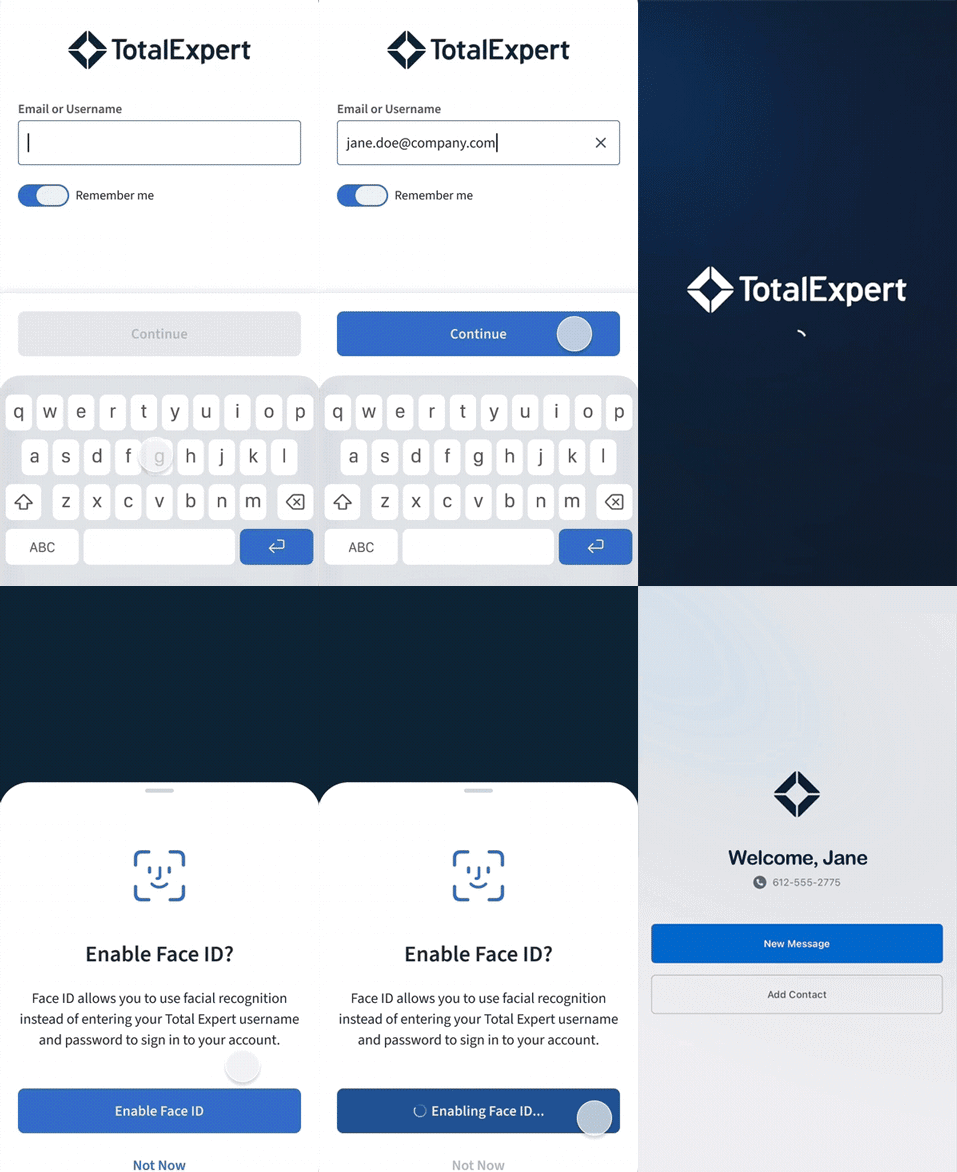
- Biometric support for SSO users: SSO-enabled organizations can now offer Face ID and Touch ID as login options, reducing friction for daily users.
- Remember Me stores email only: Balances convenience with security by remembering a user’s email address without storing credentials.
- Session timeout managed via org setting: Admins can configure session duration at the organization level, giving security teams the control they need.
Availability
- Audience: Engage SMS clients using the mobile app. Admin configuration required.
- Status: Generally Available
How to get started
Users will be prompted to update to the latest version of the mobile app.
Contact-Level Task Management in Mobile
Why it matters
Loan officers manage their day from their phone. Contact-Level Task Management helps bring one of the most-requested mobile capabilities to life, giving users the ability to create, view, and act on tasks directly to a contact record from the Total Expert mobile app, without switching to a desktop.
What’s new
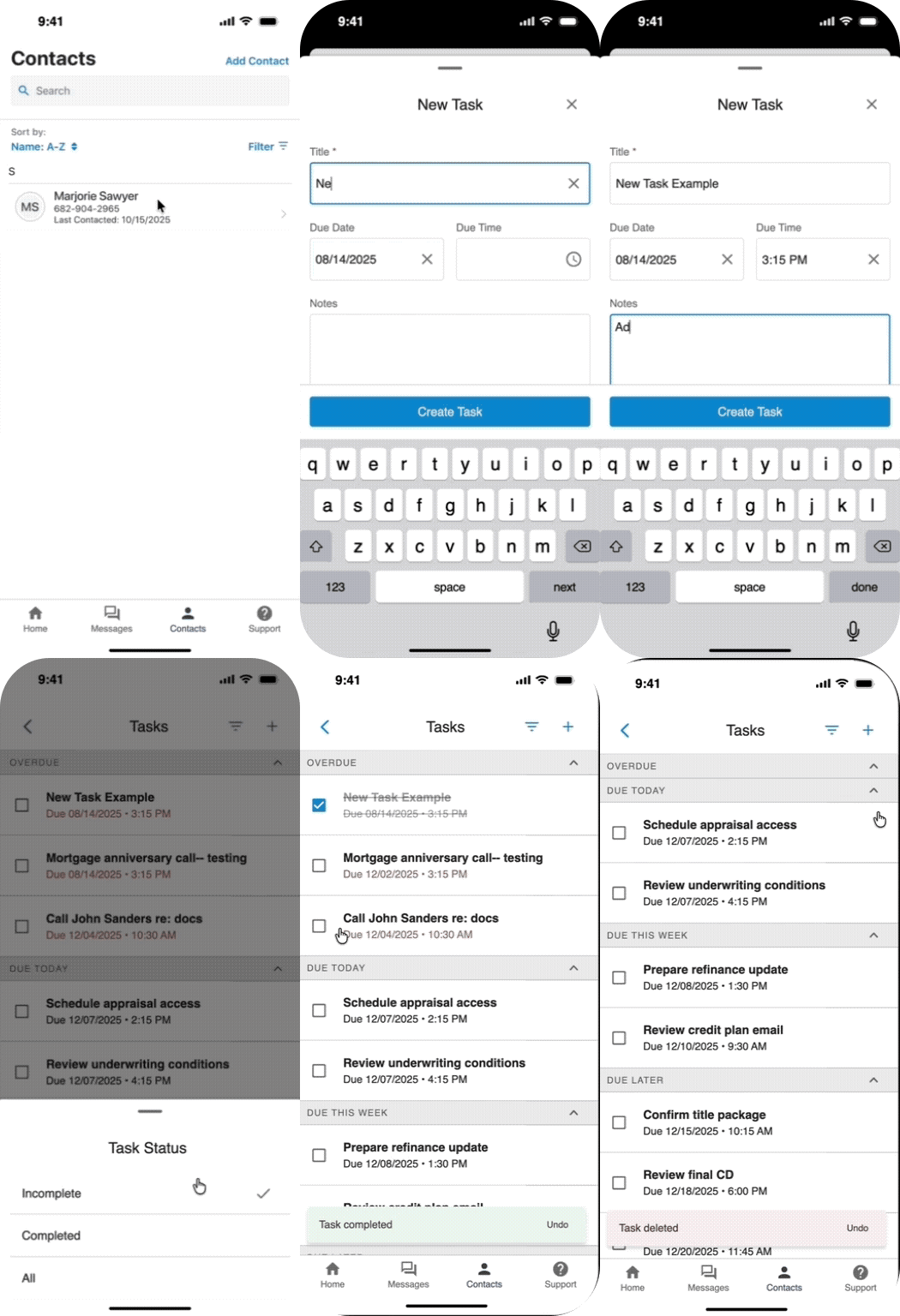
- Create and manage tasks in a Contact record: Users will be able to create single/one-time tasks and view, complete, and manage tasks directly within contact details, keeping their to-do list accessible wherever they are.
- Connected to existing task workflows: Mobile tasks sync with the web experience, so nothing falls through the cracks when users move between devices.
Availability
- Audience: Engage SMS clients using the mobile app.
- Status: Generally Available — April 16, 2026
How to get started
Ensure your teams are using the latest version of the mobile app.
AI Sales Assistant Enhancements
Why it matters
As AI Sales Assistant usage scales across organizations, managing unique configurations for individual loan officers creates significant workload. This release gives organizations the flexibility to scale AI Sales Assistant across their entire team without duplicating setup work.
What’s new
- User-level AI configuration: AI Sales Assistant can now be configured at the individual loan officer level, allowing organizations to define unique settings per user without creating separate connector instances.
- Conditional ODC payload logic: Admins can now apply conditional logic to outbound data connector payloads, so the right data is sent based on the context of each interaction, rather than a single static configuration.
- Improved Loan Officer Name Handling: AI Sales Assistant users often have corporate or team accounts that use the same name fields as individual loan officers. The AI Sales Assistant has updated how loan officer names are referred to in the talk track, including the ability to configure name pronunciation, improving borrower experience. Borrowers will now have more clarity on team and individual loan officer names during AI-assisted outreach, and names will be spoken correctly every time, reducing confusion.
- Updated MS Bookings Integration: The AI Sales Assistant has upgraded the MS Bookings integration to improve performance at scale. This update helps ensure that MS Bookings appointments remain consistent for loan officers.
- Consumer Opt-Out: When a consumer indicates they no longer wish to receive AI-driven calls, that preference now automatically updates Total Expert’s consent record. AI Sales Assistant also shares updated outcome signals, including do not contact, not interested, and angry or upset, ensuring those preferences are reflected across the platform and respected in future outreach.
Availability
- Audience: Organizations using AI Sales Assistant
- Status: Generally Available — April 30, 2026
How to get started
Contact your Customer Success Manager to review your current AI Sales Assistant configuration and learn how to take advantage of the new user-level settings.
Journey & Campaign Updates
Why it matters
As journey libraries grow and partner relationships expand, teams need better tools to understand what’s running and act on new opportunities faster. These updates give journey builders more visibility into active journey performance and new ways to automate around Co-Marketing Partner relationships.
What’s new
- Active Contacts count in Journey Stats: The Journey Stats tab now displays an Active Contacts field showing the number of contacts currently on a Journey, alongside the existing Total Contacts count. Previously, getting this number required manually totaling tiles within the Journey itself. This update provides at-a-glance visibility into how many contacts are actively being worked by each Journey.
- Co-Marketing Partner journey conditions: Journey builders can now use Co-Marketing Partner acceptance status as a Journey condition and trigger Journeys when a partner accepts an invite. This opens up new automation possibilities around partner onboarding and engagement that weren’t previously possible.
Availability
- Audience: Admins
- Status: Generally Available
How to get started
All updates are available upon release with no configuration required.
Small Changes. Big Impact.
Why it matters
The following are smaller, high-impact improvements and fixes driven directly by customer and internal feedback. They improve the day-to-day experience, remove friction, and increase reliability across key areas.
What’s new
- Reporting Center: Custom fields messaging clarity; the Reporting Center now displays clear UI messaging to inform admins that custom fields are not included in reports.
- Content: Global Image Library dropdown behavior fix; the actions dropdown now correctly closes when clicking outside of it.
Ecosystem and Expert Partner Network
Consent Management: Partner Integrations
Why it matters
In January, Total Expert introduced the foundation for consent aggregation, a new EAPI endpoint to capture consent signals from ecosystem partners and store them on the contact record. April expands that foundation significantly, with new and updated integrations that bring consent data from more sources into Total Expert. As AI-driven outreach and regulatory expectations continue to evolve, having a reliable record of consumer consent across channels is essential to engaging confidently and compliantly at scale.
What’s new
- RETR Home Value Report: RETR’s consumer portal, which gives borrowers ongoing visibility into their home value and mortgage details, will be able to capture consumer consent and share it directly with Total Expert, keeping post-close engagement compliant as borrowers interact with the platform.
- nCino Point of Sale: Building on the existing SMS opt-in sync from nCino, nCino is adding the ability to capture AI Voice consent during the application process and share it with Total Expert.
- Evocalize: Evocalize-powered digital ad campaigns will share SMS opt-in and AI Voice consent to Total Expert for contacts originating from those campaigns.
Availability
- Audience: Admins and organizations using AI Sales Assistant, RETR, nCino, or Evocalize integrations
- Status: Generally Available — end of April 2026
How to get started
Work with your Customer Success Manager and implementation team to confirm your integration configuration and ensure consent data is flowing correctly into Total Expert.
Outbound Data Connector (ODC) Enhancements
Why it matters
Outbound Data Connectors are used widely across the platform to allow API requests to interact with third-party platforms. These enhancements address known gaps in visibility, usability, and reliability.
What’s new
- ODC log visibility: A running history of ODC actions is now available, including which ODC was triggered, what was sent, and the outcome; giving teams a complete audit trail for integration activity.
- Additional reliability and usability refinements that reduce friction for users relying on ODCs in their day-to-day workflows.
Availability
- Audience: Retail Loan Officers, Loan Officer Assistants, Marketing Managers, Branch Managers, Sales Managers, and Marketing Specialists
- Status: Generally Available
How to get started
Blend Integration Enhancements
Why it matters
Total Expert’s integration with Blend is a critical connection point for lenders who rely on real-time application data to drive follow-up and engagement. This release addresses three specific gaps in how data flows from Blend into Total Expert, improving SMS reach, enriching contact data, and giving loan officers more context when starting an application.
What’s new
- SMS opt-in sync from Blend: When a borrower opts into SMS during their Blend application, that opt-in is now automatically reflected in Total Expert, expanding the number of contacts eligible for Engage SMS outreach without any manual effort.
- Middle credit score from Blend: The middle credit score captured during a Blend application is now reflected in the contact’s credit score field in Total Expert, keeping credit data current and available for downstream workflows such as targeted messaging or credit counseling referrals.
- Enhanced pre-fill when starting a Blend application from Total Expert: Loan officers now have additional options to pre-fill a Blend application directly from Total Expert, including mobile number and property type, reducing data entry and improving the experience for both the LO and the borrower. Additional data points returned from Blend (including the consumer’s search timeline, preapproval letter date, and first-time homebuyer status) are also now available in Total Expert for use in journey targeting and personalization.
Availability
- Audience: GA for clients using the Blend integration
- Status: Generally Available
How to get started
Total Expert for Salesforce 6.5
Why it matters
Total Expert for Salesforce continues to deepen the connection between Total Expert and Salesforce workflows. Version 6.5 improves how email activity is surfaced in Salesforce, expands Direct Send capabilities across more Salesforce objects, gives Salesforce users visibility into AI Sales Assistant call recordings, refines how contact data flows between platforms, and strengthens unsubscribe handling across organizations.
What’s new
- Email activity previews in Salesforce: When a Total Expert email activity is displayed in Salesforce, users can now see a preview of the email that was sent directly within the activity record — without needing to log into Total Expert. The preview is accessible via a secure, time-limited link included in the Activities API response for email delivered, email opened, and email sent activity types.
- AI Sales Assistant call recordings in Salesforce: Audio recordings (.wav) from AI Sales Assistant calls are now displayable within Salesforce activity records. When an AI Sales Assistant call activity is fed to Salesforce, the recording is surfaced directly in the engagement activity, giving Salesforce users full visibility into AI-assisted outreach without leaving their workflow.
- HTML template editing and expanded Direct Send: Salesforce users can now edit Total Expert-hosted HTML email templates directly within the Salesforce experience, including full text editing and BombBomb video embedding. Direct Send is also now available on Contact, Opportunity, and Task objects in Salesforce, supporting both individual record and list sends.
- Updated Contact Related User Mapping for Total Expert to Salesforce data flows: The Contact Related User Mapping configuration is now optional when the data flow direction is set to Total Expert to Salesforce. Instead of a required mapping, admins can configure individual field mappings for the Owner role, mapping Total Expert owner attributes such as ID, email, username, or external ID to Salesforce object fields. These values are automatically populated in Salesforce when a contact is created or updated in Total Expert.
- Domain-level email unsubscribes from Salesforce: When an email unsubscribe is shared from Salesforce to Total Expert, the payload now includes the domain of the originating loan officer’s email address alongside the existing user-level unsubscribe. This ensures unsubscribe preferences are applied at the organizational domain level, supporting more comprehensive unsubscribe policies for enterprise organizations.
Availability
- Audience: TE4SF users, including Retail Loan Officers, Loan Officer Assistants, Marketing Managers, Branch/Sales Managers, and Marketing Specialists
- Status: Generally Available — April 15, 2026
How to get started
Expert Content
Expert Content Releases
Why it matters
Expert Content provides ongoing value by giving marketing teams and loan officers ready-to-deploy assets that keep them in front of consumers at the right moments; from the earliest stages of consideration to post-close relationship nurturing.
What’s new
- Seller’s Education Marketing Package: A short email series for potential home sellers covering topics such as which upgrades deliver the best ROI, how to prepare for an open house, and more. Includes print and social content, plus an optional Bridge Loan email.
- Monthly Marketing Digest Email Template: A reusable template for marketing teams to highlight new content, campaigns, and upcoming promotions each month; a consistent, brandable starting point to repurpose each cycle.
- Covered EPN Journey: Customers integrating with Covered Insurance can send an annual insurance review reminder to borrowers with a link to a personalized quote page.

Availability
- Audience: Marketing admins and Loan Officers using Expert Content
- Status: Available as part of the current quarterly Expert Content plan
How to get started
Every update in this release is designed to help your team spend less time on manual work and more time building borrower relationships. Reach out to your CSM to get started, or visit the Knowledge Base for additional resources.