

May’s release delivers continued momentum across Lead Management, data enrichment, AI Sales Assistant, and reporting. A new integration with RETR brings home value reports directly to past borrowers. And a set of journey and campaign improvements sharpen the day-to-day experience for admins and loan officers.
Lead Management Updates
Why it matters
Lead Management keeps getting better with each release, and this month’s updates reflect direct feedback from teams using it in the field. The changes span routing flexibility, pipeline clarity, and daily usability, each one improving Lead Management features that users identified.
What’s new
- Bypass routing when a matching contact exists: Admins can now configure a routing policy to skip distribution when an incoming lead matches a contact already owned by a user within that policy. The lead is assigned directly to the existing contact owner, preserving established relationships and preventing unnecessary redistribution.
- Lead Source list filtered by role: Loan officers now see only the lead sources relevant to manual lead creation. Routing policy and third-party integration sources are hidden from the user dropdown, reducing confusion and incorrect source selection. Admins continue to see all lead sources.
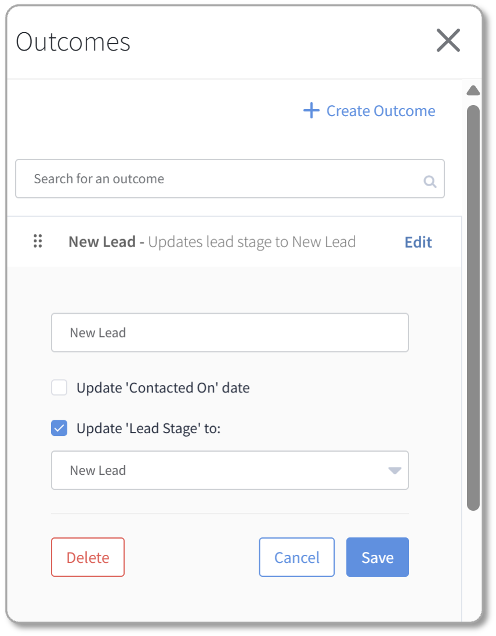
- Outcome-to-stage indicators: When logging an outcome on a lead, loan officers can now see which outcomes are configured to advance the lead stage and what stage the lead will move to before confirming. This adds clarity to a high-frequency action and prevents unintended stage changes.
- Audit trail for deleted notes and outcomes: When a note or outcome is deleted on a lead, the deletion is now captured in the audit trail, including the user who deleted it and the date and time, giving admins complete visibility into lead activity history.
- Routing policy no longer required when creating a lead in Journeys: Admins can now create leads via Journeys without assigning a routing policy. Not all lead sources require distribution logic, and removing this requirement gives journey builders more flexibility.
- Fallback routing policy now required: When a primary routing policy is assigned to a Lead Source, a fallback policy is now required. This ensures every lead has a secondary routing path if the primary policy cannot process it, keeping routing predictable.
- Co-Marketing Partner lead visibility: Co-marketing partners who own a contact can now view leads associated with that contact directly within Total Expert. View-only access — partners cannot create or edit leads.
- Update lead stage from a Journey operator: Journey builders can now change a lead’s stage directly within a journey using a dedicated operator. This allows lead stage progression to be automated as part of a broader workflow — no manual update required.
Availability
- Audience: Admins, Loan Officers, and Loan Officer Assistants with Lead Management enabled
- Status: Generally Available for clients with Lead Management enabled
How to get started
Additional enhancements including Lead stage automation, advanced referral partner management, and Lead Management on the mobile app are coming soon. Work with your Customer Success Manager (CSM) to schedule your Lead Management implementation.
Credit & Debt Enrichment
Why it matters
Understanding a borrower’s complete financial picture beyond what’s in the LOS is what separates reactive outreach from genuinely consultative engagement. Credit & Debt Enrichment brings tradeline-level financial data into Total Expert for the first time, giving lenders the context they need to reach the right contacts at the right moment with the right message.
What’s new
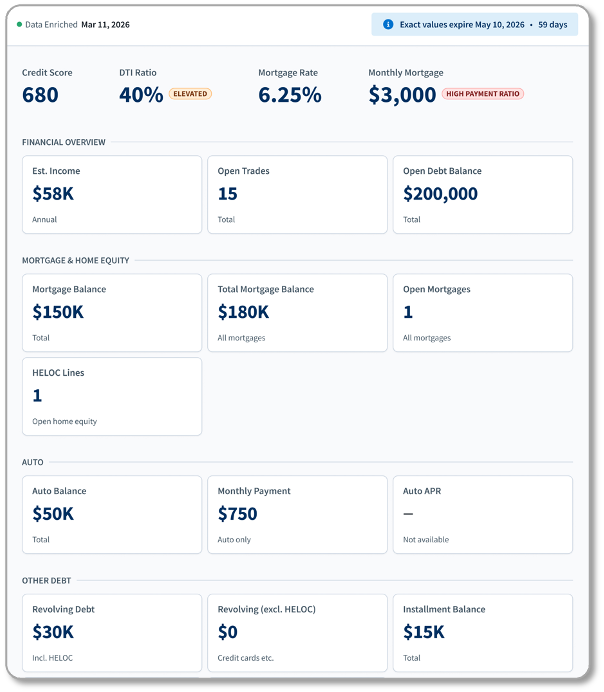
- Credit & Debt Enrichment is entering closed beta this month with select early adopter organizations. Participants will gain access to tradeline-level debt insights on their contact profiles, including balances, utilization rates, payment amounts, and interest rates.
- Admins will be able to define segments within their contact population for enrichment.
- Loan officers can be alerted through Insights when contacts cross specific financial thresholds, such as a contact’s debt utilization signaling a refinance or consolidation opportunity.
- Debt data will be available in Journey conditions, enabling automated outreach.
Availability
- Audience: Select early adopter organizations
- Status: Closed Beta
How to get started
Watch for more information when this moves to General Availability.
AI Sales Assistant Enhancements
Why it matters
As AI Sales Assistant adoption grows, organizations need efficient tools to configure users at scale, and loan officers need a consistent, reliable place to find AI-generated call data. These updates address both.
What’s new
- Bulk user configuration via Importer: AI Agent user fields — including preferred name, phonetic spelling, and transfer number — are now available for column mapping in one-time and recurring import workflows. Organizations can manage AI Agent configuration across large user populations without manual entry.
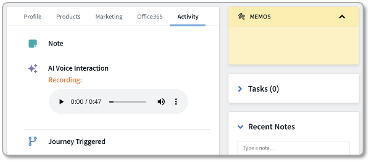
- AI Interaction note type: A new dedicated note type stores AI voice call data, recordings, summaries, and transcripts on the contact timeline. Loan officers see a consistent, structured record of every AI interaction, with an inline audio player and collapsible transcript section.
- Do Not Contact handling: When a consumer indicates to the AI Sales Assistant that they no longer wish to be contacted, that preference is accurately reflected in Total Expert. When a contact opts out during an AI voice call, three things happen simultaneously:
ok_to_callis set to false on the contact record, Voice AI consent is revoked in the consent schema, and thedo_not_contactInsight attribute is set to true.
Availability
- Audience: Organizations using AI Sales Assistant; Admins managing user configuration
- Status: Generally Available
How to get started
Journey Categories
Why it matters
Managing journey categories has historically required navigating into individual journeys to make changes. A dedicated Categories tab gives admins a centralized place to view and maintain their category structure, making it easier to keep journeys organized as libraries grow.
What’s new
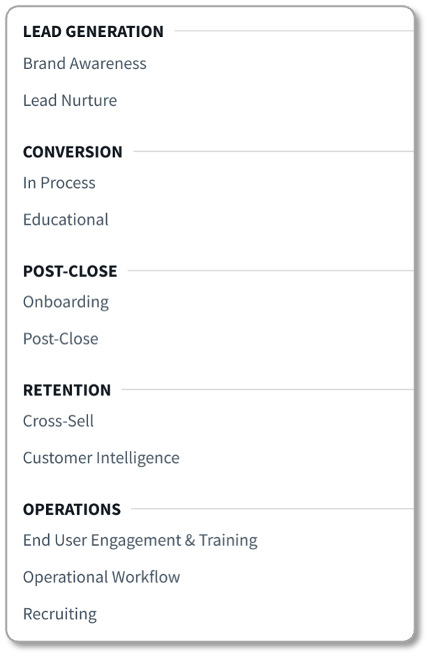
- Dedicated Categories tab: A new tab on the Journeys screen surfaces all journey categories in one place, giving admins a clear view of their full category structure without navigating into individual journeys.
- Category management: Admins can view, edit, and delete categories directly from the tab, streamlining ongoing maintenance.
- Category details at a glance: Each category displays its name, type, creation date, and the number of journeys associated with it, giving admins the context they need to make informed decisions.
Availability
- Audience: Admins who manage journeys and journey organization
- Status: Generally Available
How to get started
The Categories tab is automatically available to Admins on the Journeys screen upon release. No configuration required.
Reporting Center Updates
Why it matters
The Reporting Center keeps expanding with data that helps admins understand who’s using the platform, how contacts and loans are organized, and where action is needed. This release adds two new report templates and extends optional field parameters across a broad set of existing reports.
What’s new
- Contact List (new template): A new report that provides a filterable export of contacts with associated user email and user status fields, giving admins a cleaner way to audit contact ownership and active assignment across the organization.
- Loan and Contact List (new template): A new report that pairs loan records with their associated contact data — including user email and user status — in a single exportable view, reducing the need to join reports manually when reviewing loan-level activity.
- User Status and User Email fields now available across existing reports:The following existing reports have been updated with new optional field parameters:
- Journey Contacts — User Status
- List of LO Users and CMPs — User Status
- Email, Print, Sites Audit — User Emails, User Status
- User Info Report — User Status
- User Login and Spoof List — User Status
- Contact Groups List with Basic Contact Level Information — Contact Groups, User Email, User Status
- Contact Groups List with Contact Count — User Status
- User Integrations — User Status
Availability
- Audience: Admins who manage data, reporting, and governance
- Status: Generally Available
How to get started
All updates are available in the Reporting Center upon release. New templates appear alongside existing templates in the template browser. Optional fields are selectable when configuring any of the updated reports.
RETR HVR Integration
Why it matters
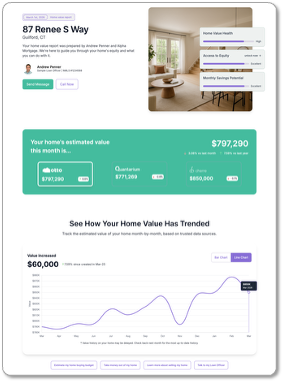
Loan officers who stay in front of homeowners between transactions build the relationships that drive repeat business. RETR HVR gives them a practical way to do that — delivering personalized home value reports to contacts and bringing borrower engagement signals back into Total Expert automatically. When a contact opens their report, that activity flows in as an Insight and can trigger a Journey, turning a passive touchpoint into an active outreach opportunity. The integration also captures SMS and Voice AI consent directly from the report experience, so organizations can grow their opt-in pool without a separate ask.
What’s new
- Personalized home value reports: Loan officers can deliver branded home value reports to contacts through RETR HVR. Report URLs are available as personalization tokens for use in email and SMS campaigns, making it easy to incorporate home value outreach into existing Journey workflows.
- Engagement Insights: When a contact engages with their home value report, that activity flows back into Total Expert as an Insight, giving loan officers a timely signal and enabling Journey-based follow-up automation.
- Consent capture: SMS and Voice AI consent collected during the home report experience syncs directly to the contact record in Total Expert and is available as a Journey condition, supporting AI Sales Assistant and Engage SMS eligibility without a separate opt-in step.
Availability
- Audience: Loan officers and admins at organizations with the RETR HVR integration enabled
- Status: Generally Available - End of May
How to get started
Work with your Customer Success Manager to determine what's needed to add the RETR HVR integration to your organization.
Expert Content
Why it matters
Expert Content gives marketing teams and loan officers ready-to-deploy assets that keep them in front of consumers at the right moments. May brings new templates and updated AI Sales Assistant journey structures to the library.
What’s new
- Event Email Templates: New email templates designed for loan officers and marketing teams to use around key consumer events and milestones, deployable immediately from the Expert Content Email Template Gallery.
- AI Sales Assistant Journey Enhancements: Updated journey structures that incorporate new Insight Attributes for AI Sales Assistant outreach, giving teams more precise triggering logic for AI-assisted engagement. Organizations already using AI Sales Assistant journeys should work with their CSM or TAM to implement the updated structures or apply the new Insight Attributes to existing journeys.

Availability
- Audience: Marketing admins and Loan Officers using Expert Content
- Status: Available as part of the current quarterly Expert Content plan
How to get started
Small Changes. Big Impact.
Why it matters
The following improvements are driven directly by customer and internal feedback. They sharpen the day-to-day experience across journeys, campaigns, and platform navigation.
What’s new
- Journeys & Campaigns
- Journey tag visibility: When more than two purposes are assigned to a journey, the full list of tags is now visible on hover over the “+X” indicator, reducing the need to open a journey just to understand its configuration.
- Journey publish cleanup: The “Template Settings” checkbox has been removed from the publish journey window. This option no longer served a function and was a source of confusion during publishing.
- Auto-Campaign group visibility: A new column on the Auto-Campaigns screen displays which groups are assigned to each campaign, so loan officers can see enrolled contacts at a glance without opening each campaign individually.
- Polly Integration — Desired Price now optional
- Loan officers using Polly for rate quotes can now leave the Desired Price field blank to receive the full range of available pricing results, rather than a narrowly filtered set. When a desired price is entered, Polly behaves exactly as before. When left blank, all available results are returned. Admins can configure this at the default and custom loan product level, and loan officers can clear the field on the rate quote screen at any time.
- Content
- Expanded font sizes for Print and Social editors: The font size dropdown now offers 18 size options ranging from 6pt to 60pt, up from the previous 7, giving users the range needed for fine-print disclaimer text and large headline copy.
- Expert Content template name auto-populates when creating an email: When creating an email from a template in the Expert Content tab, the Name field is now pre-populated with the template’s name. The field remains editable.
- Print PDF downloads now use the asset name and timestamp: Downloaded print marketing PDFs are now named using the asset’s media file name and the date and time of download, replacing the previous behavior of using an internal asset ID.
- Faster navigation from Markup Settings: Marketing admins configuring co-branded print templates can now navigate directly from the Markup Settings page to Team Settings or Media Settings for the same template, eliminating the previous 5–6 click detour back through the template library.
- Compliance Notification Threshold clarification: The Compliance Notification Threshold field in email settings now includes updated copy and a tooltip clarifying that this setting sends a notification only — it does not block or gate email sends.
- Platform - View only Active Users
- Now, when a user navigates to Organization Admin > Users, by default, they will only see Active users.
To see Inactive users, simply change the filter to All Users or Inactive Users.
- Now, when a user navigates to Organization Admin > Users, by default, they will only see Active users.
In Case You Missed It
Why it matters
These features were included in last month’s release notes, but weren’t available at the time of the announcement. Now that they’re live, they’re worth a second look to make sure you’re taking full advantage of the new capabilities.
What’s new
- Task Management in Mobile: Loan officers can now create, view, complete, and manage tasks directly within contact details in the Total Expert mobile app, keeping their to-do list accessible without switching to a desktop. Mobile tasks sync with the web experience, so nothing falls through the cracks when users move between devices.
- AI Sales Assistant Enhancements: AI Sales Assistant can now be configured at the individual loan officer level, allowing organizations to scale across their entire team without duplicating setup work. Additional updates improve loan officer name handling and pronunciation, upgrade the MS Bookings integration for better performance at scale, and ensure consumer opt-out preferences are automatically reflected in Total Expert’s consent record and respected in future outreach.
- Consent Management: Partner Integrations: New and updated integrations bring consent data from more sources into Total Expert. RETR, nCino, and Evocalize can now capture and share SMS opt-in and AI Voice consent directly with Total Expert, giving organizations a more complete and reliable record of consumer consent across channels.
- Total Expert for Salesforce 6.5: Version 6.5 deepens the connection between Total Expert and Salesforce workflows. Email activity previews are now visible directly within Salesforce activity records, AI Sales Assistant call recordings are surfaced in Salesforce without leaving the workflow, and HTML template editing is now available within the Salesforce experience. Additional updates improve contact data flow, unsubscribe handling, and expand Direct Send to Contact, Opportunity, and Task objects.
- Evocalize Lead Integration: Contacts generated from Evocalize-powered digital ad campaigns can now be shared directly into Total Expert as leads for Lead Management, giving teams a faster path from digital ad engagement to active pipeline management.
Together, these May updates strengthen the platform across the areas teams depend on most. If you want help enabling any of these features, adding them into your workflows, or understanding pricing for add-on services, reach out to your CSM or visit the Knowledge Base.