

June’s release builds on the momentum of a productive spring. Lead Management adoption continues to grow, and this month we’re adding LOS-enabled automation that keeps pipeline stages accurate without any manual effort. Tradeline data becomes available on contact records through Credit & Debt Enrichment. Group Messaging for Engage SMS arrives later this month, alongside SMS reporting coming to the Reporting Center. And a set of high-impact data and journey improvements sharpens the day-to-day experience for admins and loan officers alike.
Lead Management Updates
Why it matters
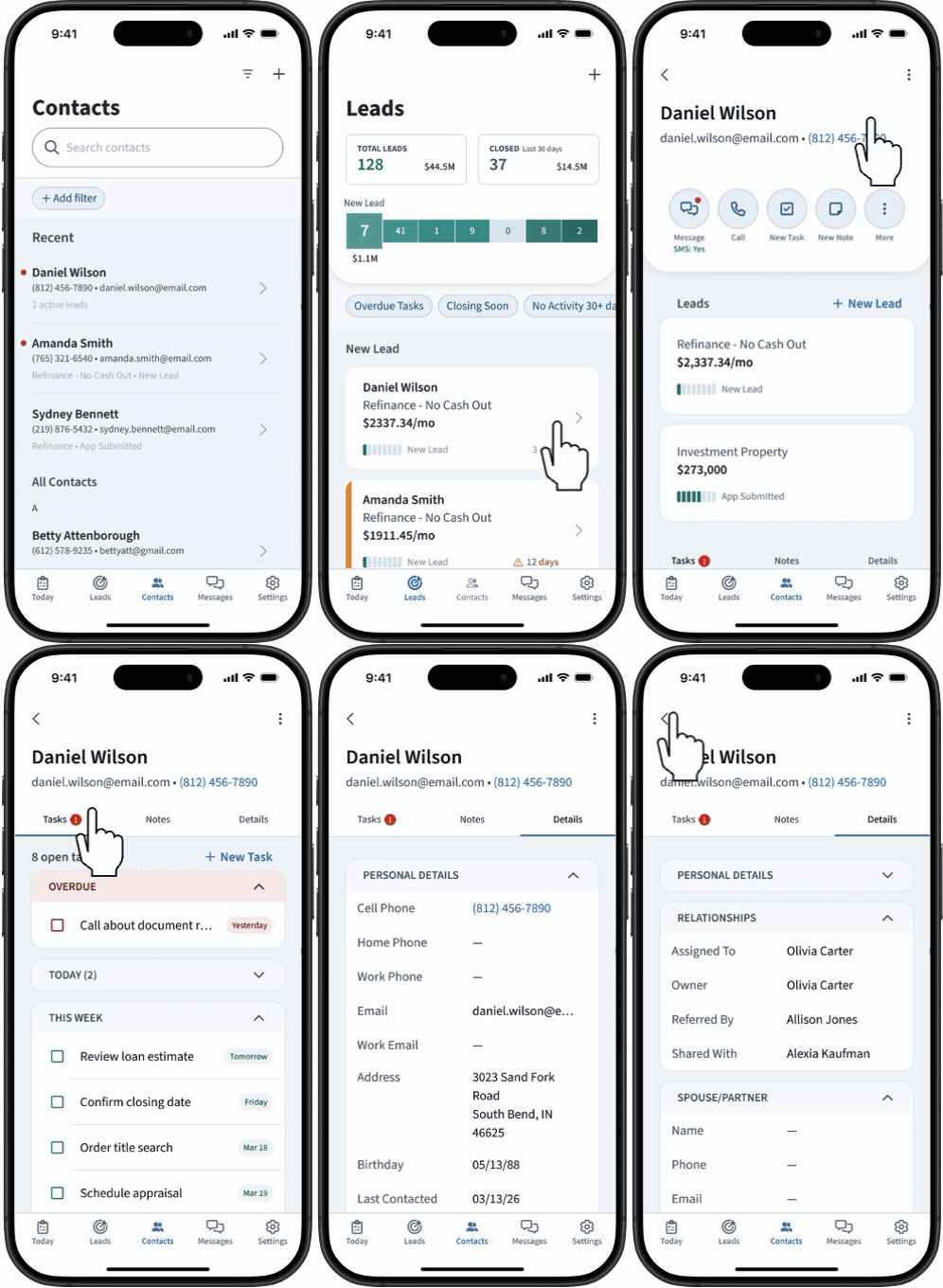
Lead Management continues to evolve with each release. June brings meaningful automation to the pipeline, reducing the manual work of keeping lead stages in sync with what’s happening in the LOS — and adds mobile access and additional data fields later in the month.
What’s new
- LOS-driven lead stage updates: When a loan status changes in the connected LOS, the corresponding lead stage in Total Expert now advances automatically — no manual update from the loan officer required. Pipeline views stay accurate in real time, reducing the administrative overhead of reconciling two systems.
- Lead Entity Support: Organizations can now include lead details — loan purpose, property information, lead ID — in Outbound Data Connector payloads to third-party systems like AI sales agents and dialers.
- Additional standard Lead Management fields: UTM parameters and additional standard fields have been added to the Lead Management object, improving lead source tracking and reporting parity with contact and loan fields. Coming by the end of June.
- Lead Management in the Mobile App: Loan officers will be able to view leads, create new leads, and log notes and outcomes for those leads directly from the Total Expert mobile app — no desktop required. Targeting a June 23rd release.
Availability
- Audience: Retail Mortgage, Loan Officers, Loan Officer Assistants, and teams that support LO workflows
- Status: Generally Available for clients with Lead Management enabled
How to get started
Work with your Customer Success Manager (CSM) to enable Lead Management for your organization, including the implementation services package required.
Customer IQ: Credit & Debt Enrichment – Beta
Why it matters
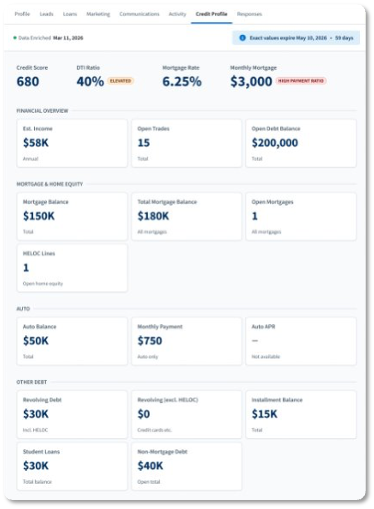
Delivering on our strategy to provide the most comprehensive financial picture of a consumer, Credit & Debt Enrichment brings tradeline-level debt data into Total Expert for the first time — balances, utilization rates, payment amounts, and interest rates — giving loan officers the context to identify refinance, consolidation, and recapture opportunities before a competitor does. And because that data flows directly into Journeys, outreach can happen automatically.
What’s new
- Tradeline-level debt data on contact profiles: Admins can define segments of their contact population for enrichment. Once enriched, contact profiles display debt data including balances, utilization rates, payment amounts, and interest rates — giving loan officers a significantly deeper view of each borrower’s financial situation.
- Journey conditions: Tradeline-level fields — including DTI, auto loan balances, mortgage information, and credit score — are available as conditions in Journey workflows, enabling automated outreach when a contact’s debt profile is above a configured threshold.
- Insight alerts: Loan officers receive alerts through Insights when contacts meet meaningful financial thresholds, such as a debt profile signaling a refinance or consolidation opportunity, so outreach is relevant without manual monitoring.
Availability
- Audience: Retail Mortgage, Loan Officers, Loan Officer Assistants, and teams that support LO workflows
- Status: Beta
How to get started
Contact your CSM or Account Executive to learn about adding Credit & Debt Enrichment and how to configure Journey conditions using debt data.
Engage SMS: Group Messaging
Why it matters
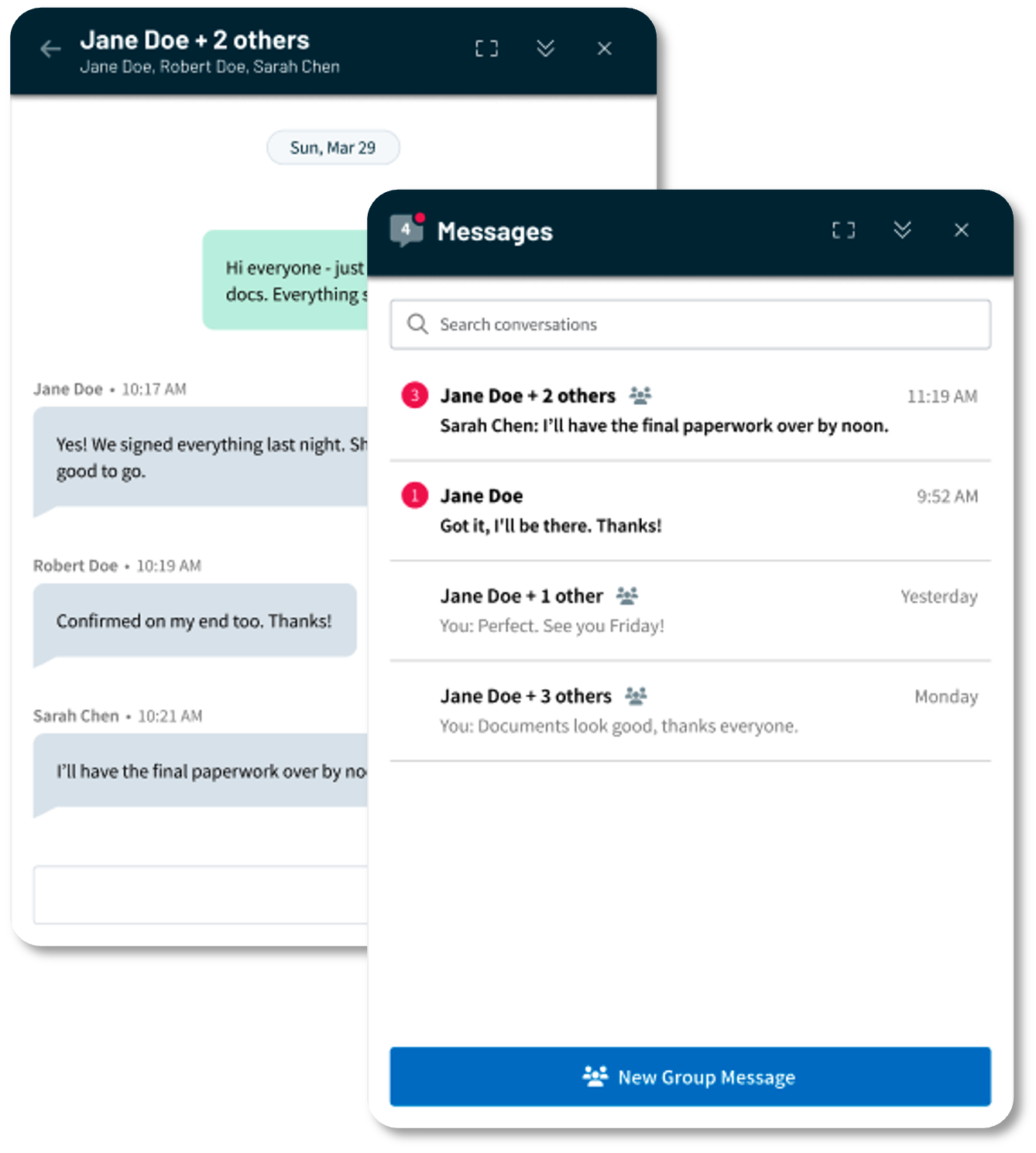
Many loan transactions involve multiple participants — co-borrowers, real estate agents, title contacts — and coordinating across them through individual conversations creates friction and gaps in communication. Group Messaging brings the ability to send, receive, and manage group SMS conversations with multiple participants directly from Total Expert.
What’s new
- Group conversation creation: Users can start a group SMS conversation with multiple participants, with loan-aware suggestions surfacing co-borrowers, buyer’s agents, and other relevant contacts based on opt-in status.
- Consistent inbox experience: Group conversations appear alongside individual conversations in the messaging inbox with clear visual indicators, and unread group messages are flagged the same way as individual ones.
Availability
- Audience: Engage SMS clients
- Status: Coming later in June for Desktop. Access to group messaging on the Mobile App will follow in August.
How to get started
Contact your CSM to request access for your organization.
Like all Engage SMS messages, group messages consume SMS segments as part of your organization’s Engage SMS usage. A segment is a single unit of SMS delivery — messages longer than 160 characters are automatically split into multiple segments. When a group message is sent, each delivery to each participant in the conversation counts toward your organization’s segment usage, the same way individual SMS messages do. Organizations with higher messaging volume should work with their CSM to review current usage and ensure their plan accommodates group messaging activity.
Engage SMS Reporting Center Report
Why it matters
Engage SMS is one of the highest-engagement channels in Total Expert, but visibility into SMS utilization has historically required a manual custom report request. Bringing Engage SMS data into the Reporting Center gives admins direct, self-service access to SMS engagement metrics without waiting on a data team.
What’s new
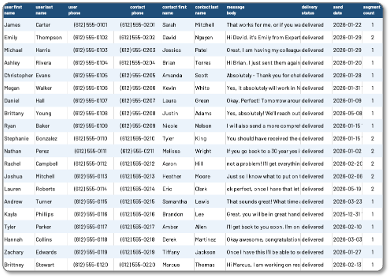
- Engage SMS report in the Reporting Center: A new template provides admins with self-service access to Engage SMS utilization data, including message volume, opt-in rates, and user-level activity, in the Reporting Center.
- Replaces the previous process of submitting a custom report request through support or CSM channels.
Availability
- Audience: Admins who manage data, reporting, and governance
- Status: Generally Available
How to get started
The new report template is available in the Reporting Center upon release. No configuration required.
Expanded MLS Coverage
Why it matters
MLS data is foundational to the listing flyer, single property site, and rate marketing workflows that loan officers use to stay relevant with their real estate agent partners. Broader coverage means more loan officers can use these tools in their markets — and fewer gaps in the field.
What’s new
Total Expert has added 18 new MLS connections over the past several months, expanding coverage across the country:
- Information and Real Estate Services, LLC (IRES)
- Bryan-College Station Regional MLS
- Central Iowa Board of Realtors
- Teton Board of Realtors
- Greater Chattanooga Association of Realtors
- Prescott Area Association of Realtors
- Black Hills Association of Realtors
- Lake City Board of REALTORS / North Florida MLS (NFLMLS)
- Hudson Valley Catskill Region MLS / Ulster County Board of Realtors
- Northern Mountains of Pennsylvania MLS
- Nacogdoches County Board of Realtors / Deep East TX MLS
- Central Missouri Board of Realtors
- Ashland Area Board of Realtors (KY)
- Northeast Georgia Board of Realtors
- Southeastern Indiana Board of Realtors (SIBOR)
- Western Nebraska Board of Realtors
- Tiftarea Board of Realtors
- South Central Kentucky Association of Realtors
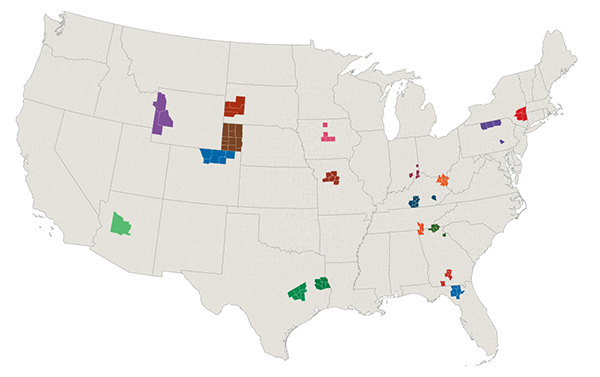
Availability
- Audience: All users of listing flyers, single property sites, and MLS-integrated print assets
- Status: Generally Available
Expert Content
Why it matters
Expert Content gives marketing teams and loan officers ready-to-deploy assets that keep them visible with consumers at the right moments. June’s additions expand the Email Builder’s design flexibility and introduce a new seasonal postcard series for direct mail outreach.
What’s new
- Email Builder header options: New left-aligned and right-aligned, logo-only header blocks are now available in the Email Builder Content Block Gallery, complementing the existing centered header option. Gives marketers more layout flexibility when building branded email templates.
- Seasonal postcards — home maintenance: The first round of seasonal postcards focused on quarterly home maintenance tips is now available. Includes 24 total postcards — one per season — in single-branded and co-branded variations across direct mail, non-direct mail, and EDDM mailing types.

Availability
- Audience: Marketing admins and Loan Officers using Expert Content
- Status: Generally Available as part of the current quarterly Expert Content plan
How to get started
Small Changes. Big Impact.
Why it matters
The following improvements are driven directly by customer and internal feedback. They sharpen the day-to-day experience across platform administration, reporting, journeys, and content.
What’s new
- Platform / Administration
- Organization Users page defaults to active users: The Organization Users page now defaults to showing only active users on load, removing the noise of inactive and suspended accounts from the default view. Admins can still filter to see inactive or all users via the Status dropdown.
- Consent
- AI Communications column in Communication Preferences: A new optional column in the Communication Preferences view shows each contact’s AI Voice consent status (Opted In, Opted Out, or blank if not set), giving loan officers and CS teams immediate visibility into AI outreach eligibility without opening the full contact record.
- Reporting Center
- Journey Name filter on Journey Contacts report: The Journey Contacts report now supports filtering by Journey Name, allowing admins to pull data for a specific journey rather than all journeys at once — useful for targeted journey audits at organizations with large libraries.
- Journey ROI report template: A new Journey ROI template generates both an aggregate summary and a loan-level detail view, showing contacts reached, user access, and loans tied to journey activity. Helps admins and managers measure the actual business impact of their Journey programs.
- Additional usability and filter improvements: The Reporting Center download results modal now scrolls; the Loan and Contact List report supports filtering by loan participant role; and several optional filter parameters have been expanded or corrected across existing report templates.
- Journeys
- Auto-Campaign group visibility: A new Groups column on the Auto-Campaigns screen shows which contact groups are assigned to each campaign at a glance — loan officers no longer have to click into each campaign individually to see who is enrolled.
- Content
- New printer integration — One Step Services: Print orders for standard flyers, postcards, greeting cards, brochures, door hangers, and rack cards will now route through One Step Services, offering lower pricing on most items, more flexible order quantities, and 2-Day FedEx shipping on print-and-ship orders, all backed by a dedicated support team. See the updated Print Pricing Guide for details.
In case you missed it
Why it matters
These features were released in last month’s release notes but may not have received full attention at the time. They’re worth a second look.
What’s new
- RETR Home Value Report Integration: Loan officers can deliver branded, personalized home value reports to contacts through RETR HVR. When a contact engages with their report, that activity flows back into Total Expert as an Insight — giving loan officers a timely signal and enabling Journey-based follow-up automation. SMS and Voice AI consent collected during the report experience also syncs directly to the contact record and is available as a Journey condition, supporting AI Sales Assistant and Engage SMS eligibility without a separate opt-in step.
- ODC: Lead Entity Support: Organizations with Lead Management can now include lead details — loan purpose, property information, and lead ID — in Outbound Data Connector payloads to third-party systems like AI sales agents and dialers. Released May 29, 2026.
Together, these June updates reflect continued investment in the tools loan officers and admins depend on most. Reach out to your CSM to enable any of these features or fold them into your workflows, and visit the Knowledge Base for additional resources.