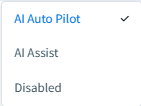

This article describes the organization-, user-, and contact-level settings that control whether the SMS Assistant has auto pilot or AI Assist enabled, or is fully disabled.
Behavior Overview
The following table provides an overview of the AI SMS Assistant settings hierarchy related to level of autonomy and expected behavior.
| Org Setting | User Setting | Contact Setting | Behavior |
| AI Auto Pilot | AI Auto Pilot | AI Auto Pilot | AI creates and sends messages autonomously; no LO action required. |
| AI Auto Pilot | AI Auto Pilot | AI Assist | AI creates draft, LO must approve before sending to this contact. |
| AI Auto Pilot | AI Auto Pilot | Disabled | AI is not available for this contact. |
| AI Auto Pilot | AI Assist | AI Assist | AI creates draft, LO must approve before sending to this contact. |
| AI Auto Pilot | AI Assist | Disabled | AI is not available for this contact. |
| AI Auto Pilot | Disabled | Disabled | If the AI SMS Assistant is disabled at the user level, it is not available for any contact. |
| AI Assist | AI Assist | AI Assist | AI creates draft, LO must approve before sending to this contact. |
| AI Assist | AI Assist | Disabled | AI is not available for this contact. |
| AI Assist | Disabled | Disabled | If the AI SMS Assistant is disabled at the user level, it is not available for any contact. |
| Disabled | Disabled | Disabled | If the AI SMS Assistant is disabled at the org level, it is not available for any user or any contact. |
Organization Settings
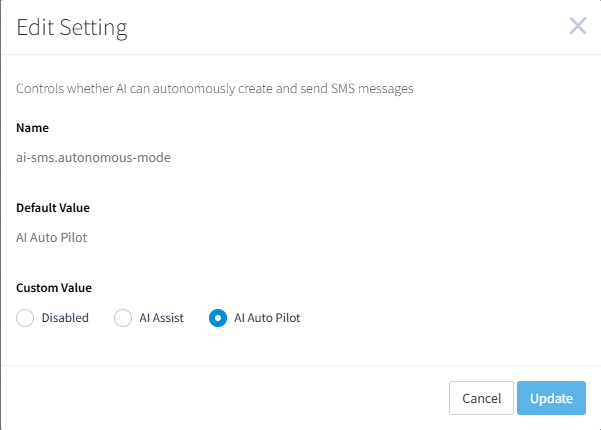
Navigate to Organization Admin > Organization Settings. The associated Organization Setting is ai-sms.autonomous-mode which controls whether AI can autonomously create only, or autonomously create and send SMS messages for this organization.
- Disabled: the AI SMS Assistant is disabled for the org.
- AI Assist: the AI SMS Assistant will autonomously create, but not send SMS messages. Users are notified when AI-generated response drafts are ready for manual review and send.
- AI Auto Pilot: the AI SMS Assistant will autonomously create and send SMS messages. Users are notified when AI-generated responses are sent.
User Settings
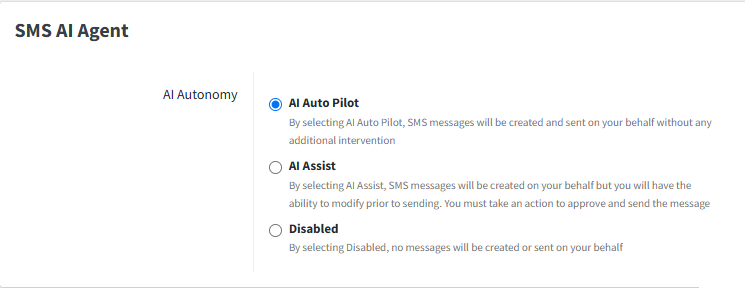
Navigate to a user's Marketing Profile settings page to view and edit the SMS AI Agent settings panel, which controls whether AI can autonomously create only, or autonomously create and send SMS message for this specific user.
- AI Auto Pilot: the AI SMS Assistant will both autonomously create and send SMS messages for this user. Users are notified when AI-generated responses are sent. This user setting is only available when the org setting is set to AI Auto Pilot.
- AI Assist: the AI SMS Assistant will autonomously create, but not send SMS messages. The user is notified when AI-generated response drafts are ready for manual review and send. This user setting is only available when the org setting is set to AI Auto Pilot or AI Assist.
- Disabled: the AI SMS Assistant is disabled for this user. This prevents the AI SMS Assistant from ever triggering for this user.
Contact Settings
Navigate to a contact record and click the Message button in the upper-right of the record or into the message panel at the bottom right of the page.
- AI Auto Pilot: the AI SMS Assistant will both autonomously create and send SMS messages to this contact. Users are notified when AI-generated responses are sent. This contact setting is only available when the user setting and the org setting are set to AI Auto Pilot.
- AI Assist: the AI SMS Assistant will autonomously create, but not send SMS messages to this contact. The user is notified when AI-generated response drafts are ready for manual review and send. This contact setting is only available when the user setting is set to AI Auto Pilot or AI Assist and when the org setting is set to AI Auto Pilot or AI Assist.
- Disabled: the AI SMS Assistant is disabled for this contact. This prevents the AI SMS Assistant from ever triggering for this contact.