

The October release includes impactful new Lead Management enhancements, including routing options for branches and teams, and the option to set Pipeline Views as the default landing page, as Lead Management continues to evolve for loan officer productivity based on customer feedback. The AI Sales Assistant adds Aged Pre-Approval and HELOC talk tracks, and admins can now track Scenario Assistant and SMS Assistant usage, outcomes, and ROI signals in a new Analytics tab and shape the SMS Assistant’s voice with persona and custom instruction settings. Enrichment & Insights (formerly Customer Intelligence) settings now support And/Or rules and a Most Recent Funded Loan option. New Bulk APIs speed up high-volume data syncs, and group messaging is now available in the Mobile App.
In case you missed it, AI Data Assistant is now available to admins by request. Be sure to read Small Changes. Big Impact. for customer-requested updates to lead imports, Pipeline View filters, email, print, and reporting and follow our Coming Soon section at the bottom to see what's on the way.
Lead Management: Branch and Team Manager Routing Controls
Action type: Recommended for organizations with branch or team structures; optional for single-team organizations.
Why it matters
Branch and team managers can update their own lead routing without waiting on a central admin. Admins keep full oversight. This update builds on feedback from organizations already using Lead Management, and it's part of our continued investment in getting every lead to the right loan officer, quickly.
What's new
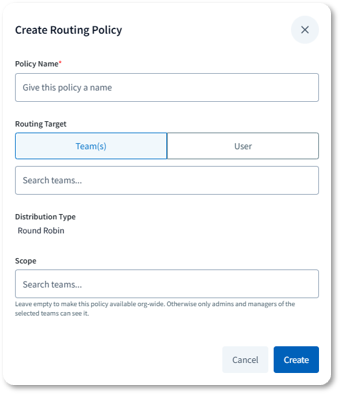
- Scoped sources and routing policies: Lead sources and routing policies can now be scoped to a branch or team. Building on existing lead sources and routing policies, branch and team managers can now create and edit the sources and policies for their own scope, and a scoped policy applies only to leads within that scope. Managers cannot see or change the configurations of other branches.
- Admin oversight and override: Org and Admin users keep full visibility and override across every branch, and can control whether scoped sources and policies are editable by managers. The Sources and Policies tables can be filtered by scope, and the admin view highlights scoped sources and policies that need attention, such as items where none of the scope teams has an active manager.
- Built-in guardrails: Scoped sources are validated for compatibility with the routing policies they are paired with, and each scoped policy carries explicit scope teams, so routing stays inside the branch that owns it.
Availability
- Audience: Admins and Team/Branch Managers at organizations with Lead Management enabled.
- Status: Generally Available for organizations with Lead Management. Off by default.
How to get started
- Admins: Reach out to your CSM to enable.
- Lead Management User Guide
Pipeline Views: Configurable Default Landing Page
Action type: Recommended for organizations whose loan officers work primarily from Pipeline Views.
Why it matters
Loan officers can start each day in their pipeline instead of navigating to it.
What's new
- Organization-level default landing page: Admins can set Pipeline View contact lists as the default landing page for their organization. Changes to the organization default are logged for audit purposes.
Availability
- Audience: Users with the Landing Page Redirect permission land on Pipeline Views when they log in.
- Status: Generally Available for all organizations. Off by default.
How to get started
- Admins: Reach out to your CSM or submit a TAM ticket directly to enable.
- Tip: Set up Pipeline Views for those roles first so users land on a useful view.
- Pipeline Views on the Total Expert Knowledge Base
AI Sales Assistant: Aged Pre-Approval and HELOC Talk Tracks
Action type: Recommended for organizations using the AI Sales Assistant with aging pre-approvals or home equity opportunities.
Why it matters
The AI Sales Assistant can now follow up with borrowers whose pre-approvals have expired and with past customers who may qualify for a HELOC.
What's new
- Aged Pre-Approval talk track: Re-engages contacts whose pre-approval has aged beyond its approval window, with the goal of reactivating the pre-approval or starting a new application.
- HELOC talk track: Adds home equity line of credit as a new conversation category for the assistant, aimed at existing mortgage customers with home equity potential.
- New "Application Started" outcome: The HELOC track records "application started" as its primary outcome. This is a new outcome type in Total Expert. The two talk tracks otherwise run on the existing AI Sales Assistant.
Availability
- Audience: Loan Officers and Admins at organizations using the AI Sales Assistant.
- Status: Generally Available for customers with AI Sales Assistant.
How to get started
- Admins: Contact your CSM to add the Aged Pre-Approval and HELOC talk tracks. A services project will be required.
- Consent: These talk tracks require appropriate TCPA consent; your organization remains responsible for compliance.
- AI Sales Assistant for Loan Officers
AI Assistants: Usage Analytics for Scenario and SMS Assistant
Action type: Recommended for admins using the AI Scenario Assistant or AI SMS Assistant who want to see usage, outcomes, and ROI signals without requesting a custom report.
Why it matters
Admins can now see how their AI assistants are being used across the organization, including volume, outcomes, and ROI signals, directly in Total Expert. The assistants themselves are unchanged; this adds reporting on how they’re performing.
What’s new
- New Analytics tab: Find it next to Configuration under AI Assistants. Switch between the Scenario Assistant and SMS Assistant views, and filter by date range (This month, Last month, or Last 90 days).
- Scenario Assistant view: See run volume compared to the prior period, usage against your organization’s monthly run limit, and breakdowns by trigger source, outcome, use case (refinance or purchase), and report version. A run detail table lists each run, and a CSV export covers the full date range you select.
- SMS Assistant view: See conversations started, message usage, outcomes, use cases, and sentiment, plus ROI attribution. ROI attribution counts a conversation followed by a loan created for that contact within 90 days. It shows correlation, not proof that the conversation caused the loan. A conversation detail table shows individual messages (up to 5,000 rows on screen), and the CSV export is not capped.
Availability
- Audience: Admins with the AI Scenario Assistant: Admin permission at organizations using the AI Scenario Assistant or AI SMS Assistant.
- Status: The Scenario Assistant view is Generally Available for organizations with the AI Scenario Assistant. The SMS Assistant view is available for organizations with the AI SMS Assistant. Both views share one tab and one permission, so no separate setup is required.
How to get started
- Admins: Go to AI Assistants → Analytics and use the selector to switch between the Scenario Assistant and SMS Assistant.
- AI SMS Assistant User Guide
- AI Scenario Assistant User Guide
AI SMS Assistant: Persona and Custom Instructions
Action type: Recommended for admins who want to control how the SMS Assistant introduces itself and what tone and rules it follows.
Why it matters
Admins can now shape the SMS Assistant’s voice across the organization, including how it refers to itself and the loan officer, and rules like banned words or a required sign-off, so messages better reflect your brand. The default is unchanged: messages are still written in the loan officer’s voice unless an admin chooses otherwise.
What’s new
- Persona selection: Choose one of three organization-wide personas: Loan Officer (first person, the default), a named Assistant (introduces itself by a name you choose, up to 60 characters, then refers to the loan officer in the third person), or AI Assistant (identifies itself as the loan officer’s AI assistant).
- Custom instructions: Add organization-wide rules the assistant follows on every message, such as banned words or a required sign-off, up to 4,000 characters. Custom instructions shape tone and wording, but they can’t turn off compliance behavior or AI disclosure.
- Honest AI disclosure in every persona: If a consumer asks whether they’re texting a person or an AI, the assistant says so plainly, regardless of persona or custom instructions.
Availability
- Audience: Admins at organizations using the AI SMS Assistant.
- Status: Available for organizations with the AI SMS Assistant.
How to get started
- Admins: Go to AI Assistants → Configuration → SMS Assistant section to set persona and custom instructions.
- Tip: Personas are fixed templates. They don’t copy an individual loan officer’s tone or texting habits.
- AI SMS Assistant User Guide
Enrichment & Insights (Customer Intelligence) Settings: And/Or Logic and Most Recent Funded Loan
Action type: Recommended for admins who maintain inclusion and exclusion rules.
Why it matters
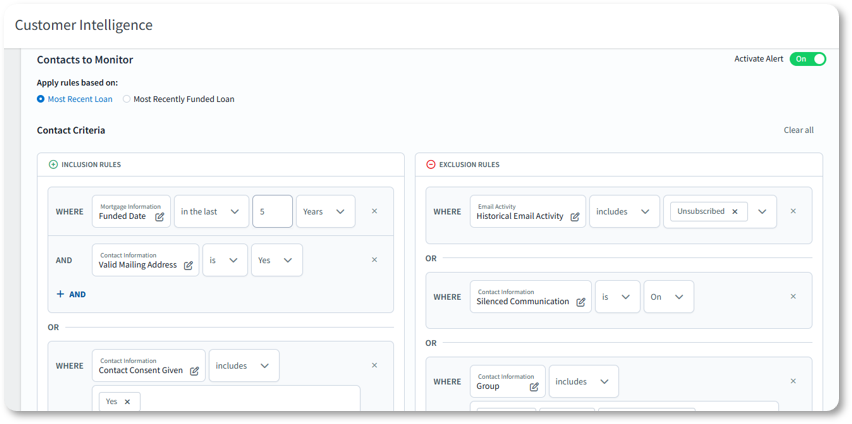
Admins are no longer limited to monitoring a single segment of contacts. Combine rules with And/Or to monitor completely different groups at once, such as a servicing portfolio and contacts who have consented to monitoring, or past customers and a set of prospects. More precise rules also mean fewer irrelevant alerts for loan officers. These are the same options added to Pipeline Views last month, and they’re coming soon to Campaign Builder.
What's new
- And/Or logic in inclusion and exclusion rules: For each alert type, admins can combine conditions with And/Or, so one rule set can cover multiple segments instead of forcing a single choice.
- Most Recent Funded Loan option: Rules can be based on a contact’s most recent funded loan rather than their most recent loan of any status.
Availability
- Audience: Admins at organizations with Enrichment & Insights (Customer Intelligence).
- Status: Generally Available.
How to get started
- Admins: In Customer Intelligence Settings, review the inclusion and exclusion rules for each alert type and add And/Or conditions or the funded-loan option where needed.
- Tip: Rule changes can affect how many contacts are monitored. Your CSM can confirm your count still fits your contract.
- Customer Intelligence Settings
Bulk APIs for Contacts and Loans
Action type: Recommended for enterprise customers and any developers or partners who sync large data volumes.
Why it matters
New bulk endpoints let integrations send many contacts or loans in a single request. High-volume syncs run faster and more efficiently.
What's new
- Bulk contacts: New endpoints to create or update multiple contacts in a single request, and to update existing contacts in bulk.
- Bulk loans: A new endpoint to create multiple loans in a single request, including borrower and participant details.
- Built for large batches: Up to 1,000 records per request, with requests over the limit rejected. An idempotency key makes retries safe, and deduplication options are supported.
Availability
- Audience: Developers, integration admins, and partners with Total Expert API access.
- Status: General Availability
How to get started
- Developers: review the updated public API reference for the contacts/bulk and loans/bulk endpoints.
- Total Expert Public API: Bulk Loans
- Total Expert Public API: Bulk Contacts
Mobile App: Group Messaging
Action type: Recommended for Engage SMS organizations whose loan officers use the Mobile App.
Why it matters
Loan officers can text co-borrowers, spouses, and agents in one thread from their phone. Group messaging was previously available only on desktop.
What's new
- Start a group from the app: The app suggests the people on the loan, including co-borrowers, spouses, and agents, and shows who has opted in. Groups support up to 10 participants, and selecting the same people again opens the existing thread.
- One conversation list: Group and one-to-one conversations appear together, sorted by recent activity, with pinning, mark read/unread, an unread badge, and push notifications for inbound group messages.
- Clear threads: Each message shows who sent it, and per-message delivery status (for example, "Delivered to 4 of 5") makes failed or partial deliveries easy to spot.
- Opt-outs handled for you: When a participant replies STOP, they are removed from the group and the composer is disabled for them with a clear explanation. Group messages also appear in each participant's contact activity log.
- Search and filter: Find conversations by participant name, contact, or loan number, and filter by message status (All, Unread, Read).
Availability
- Audience: Loan Officers at organizations with Engage SMS who use the Total Expert Mobile App.
- Status: Generally Available upon app update.
How to get started
- Loan officers: Update the Mobile App, then use the new group message option in the conversation list.
- Tip: Each delivery to each participant counts toward SMS segment usage; check usage anytime in SMS Management.
- Total Expert Mobile App Group Messaging
- Engage SMS: Group Messaging
ICYMI: AI Data Assistant
AI Data Assistant, introduced in September, is now available to Admins by request at organizations with Enrichment & Insights (Customer Intelligence). Admins can ask questions about their Enrichment & Insights data in plain English and get analytics, trends, and insights without building a report or submitting a custom report request. Responses include charts that can be downloaded as PNG files, and past conversations are saved so you can pick up where you left off. Life Events data is not included.
Expert Content
Why it matters
Expert Content provides ongoing value by giving marketing teams and loan officers ready-to-deploy assets that keep them in front of consumers at the right moments; from the earliest stages of consideration to post-close relationship nurturing.
What's new
- Notecard Templates
- Static self-serve templates in Print & Ship and Direct Mail let admins upload fully designed assets—such as event invitations or greetings—to send to a contact list, or upload notecard designs users can personalize with handwritten notes and addresses.
- Layout templates let admins assign templates as-is or modify branding and text to create new versions. These templates, intended for users to personalize with handwritten notes and addresses, are available for Print & Ship ordering.
Availability
- Audience: Marketing admins and Loan Officers using Expert Content
- Status: Available as part of the current quarterly Expert Content plan
Small Changes. Big Impact.
Why it matters
The following improvements are driven directly by customer feedback and internal learnings. They sharpen the day-to-day experience across lead imports, filters, email, print, and reporting.
What's new
Lead Management
- Suppress Email Marketing on Imports and API Lead Creation (Admins, Technical Teams): Leads and contacts created through the Importer or API now respect the "suppress email marketing" field. When it is enabled, no journey automation starts for those records; when it is disabled, journeys proceed as usual. Admins or technical teams who import records or create them through the API should include the field wherever they want to hold automation. Lead Management User Guide
- Pipeline View Filter Usability (Loan Officers, Loan Officer Assistants, Sales Managers, Admins): Multi-select filter fields without a fixed list of options now support type-ahead search, full option names display without horizontal scrolling, and available values appear as soon as you open the dropdown, which makes custom fields much easier to filter. No action required. Pipeline Views
- AI SMS Preference Filter (All Pipeline View Users): The AI SMS Preference filter in the new filter experience now displays its available options. No action required.
Content
- Copied Emails Keep Their Folders and Tags (Marketing Admins): Copying an email from the Email List page or the Organization Content tab of the Template Gallery now carries over the original's folder and tag assignments, so there's no need to re-file and re-tag each copy. Copies made before this change are not updated. No action required. Folders & Tags Playbook
- Save Draft Is Now the Primary Button (Users Who Edit Emails in an Approval Flow): The primary button in the email editor now saves the draft without submitting it for approval, which avoids accidental submissions that are hard to undo. "Save Draft & Request Approval" has moved to the dropdown next to it. Users who submit emails for approval should use the dropdown going forward.
- Collapsible Elements Panel in Email Builder (Marketing Admins, Loan Officers): The Elements panel can now be collapsed to give you more room to work on the canvas, with the collapse control placed on the edge of the panel. No action required. Email Builder
- EDDM Payment Popup Corrected (Marketing Admins): The Every Door Direct Mail payment agreement popup no longer shows a message about recipient list processing changing quantity and cost, which applies to Direct Mail but not EDDM. Direct Mail is unchanged. How to Order EDDM Postcards
Data
- Reporting Center: More Fields in the Print & Social List (Admins, Marketing Admins): The Print & Social List report now includes auto-archive, expiration date, and expires-in-days fields, which were frequent custom report requests. Available automatically in Reporting Center. Reporting Center Knowledge Base
- Reporting Center: Large Reports Split Into Smaller Files (Admins, Marketing Admins): Reporting Center exports too large to open in Excel are now automatically split into multiple smaller files, so reports with long date ranges stay usable. No action required. Reporting Center Knowledge Base
- Reporting Center: Type-Ahead Search for Journey Names (Admins, Marketing Admins): Journey name filters in Reporting Center now suggest matching journeys as you type, so you don’t need to remember the exact name. Because you pick from journeys in your organization, a misspelled name no longer returns an empty report. No action required. Reporting Center Knowledge Base
Coming Soon
Watch for updates in upcoming Release Notes:
- Email Builder: More Flexible Locked Content (Admins, Loan Officers): Building on element locking available today, admins will be able to let loan officers edit a locked element without removing it, or require an edit before an email can be sent, so contacts don't receive unedited placeholder text. Applies to text, image, video, button, BombBomb, and Vidyard elements, plus subject and preheader.
- Mobile App Push Notifications for Lead Assignment and Sharing (Loan Officers with Lead Management): Real-time push notifications when a lead is assigned or shared, plus a new Notifications tab in the Mobile App to review and act on them with Message and Call quick actions. Hourly batching keeps busy days manageable, loan officers can adjust or turn off batching, and admins will be able to enable the feature for their organization.
- Redesigned Mobile App Home Screen (Loan Officers, Sales Managers): A Mobile App home screen built around your day: overdue and upcoming tasks, lead metrics for Total, New, and Contacted leads that tap through to filtered lists, and Key Moments such as upcoming birthdays, loan anniversaries, and holidays with call and message shortcuts. Organizations without Lead Management get an equivalent Contact Overview.
- Campaign Builder: And/Or Audience Logic and Most Recent Funded Loan (Admins, Marketing Admins): Brings the And/Or logic and funded-loan options now available in Pipeline Views and Customer Intelligence settings to Campaign Builder audience criteria, so campaign audiences can be built more precisely without stacking multiple campaigns.
- LenderPrice Pricing Engine Integration (Loan Officers, Admins): Loan officers who use LenderPrice will be able to request real-time rate quotes in Total Expert and generate rate flyers from LenderPrice pricing data, and use that pricing data in Outbound Data Connector payloads and Journey automation. Joins Optimal Blue and Polly in the pricing engine lineup.
- EPPS Pricing Engine Integration (Loan Officers, Admins): Adds Encompass Pricing & Product Engine (EPPS) from ICE Mortgage Technology as a supported pricing engine for rate quotes and rate flyers, bringing live rates inside Total Expert for organizations already working in the ICE ecosystem.
- GiftHomie Integration (Expert Partner Network): Loan officers will be able to send thoughtful, customized gifts to borrowers through GiftHomie without leaving Total Expert. Borrower contact information and the gift selection are sent to GiftHomie, GiftHomie delivers the gift on the loan officer's behalf, and the gift and tracking details are reported back to Total Expert.