

September's release brings enhanced visibility and control to pipeline views, expands mobile capabilities, and deepens AI-driven workflows. Lead Management continues to evolve for loan officer productivity. Mobile app users get powerful new filtering and view customization, native contact and lead editing on mobile with loan association. The month also adds critical Salesforce integration enhancements, email template protections, and expands MLS network availability. Read on for what's new and check out the new “Coming Soon” section.
Pipeline Views Expansion
Why it matters
Loan officers need complete visibility into their pipeline with the flexibility to organize, filter, and prioritize based on loan and lead data.
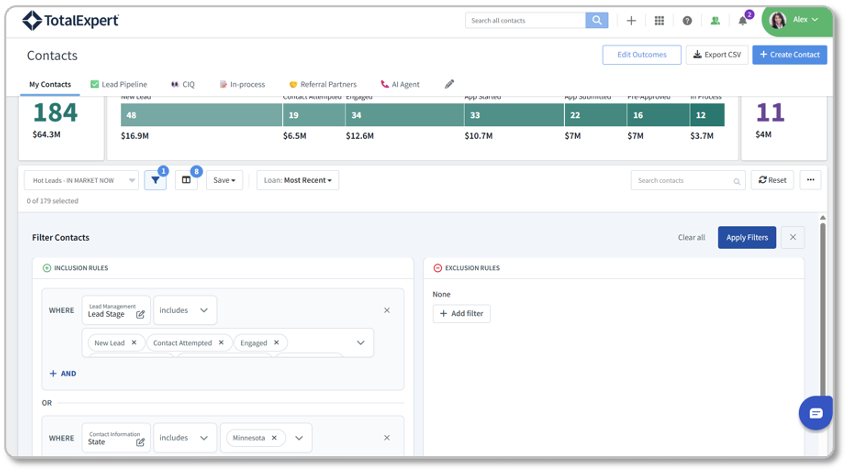
This month, we continue to evolve the functionality and look of Pipeline Views for Total Expert users. Last month, we introduced a new "fly-out" panel. Now, we have expanded Pipeline Views with new columns, filtering options, and display capabilities that give LOs and managers precise control over how they view and act on their pipeline.
What's new
- Custom Loan Fields as Columns: Admins can now add custom loan fields as columns in Pipeline Views, bringing custom data directly into the pipeline view alongside standard fields.
- Advanced Filtering with And/Or Conditions: Pipeline View filter rules now support both And/Or logic, enabling more sophisticated inclusion and exclusion rules. Create complex filters like "Show loans where Status = Active AND (Priority = High OR Owner = CurrentUser)."
- Most Recent Loan vs. Last Funded Loan Toggle: Admins can configure whether Pipeline View shows the most recent loan associated with a contact or the last funded loan, giving flexibility based on organizational workflow.
- Email Unsubscribed Field Visibility: The "Is Email Unsubscribed" field is now available as a Pipeline View column and filter in Customer Intelligence settings and in Campaign Builder audience inclusion/exclusion rules, enabling LOs to identify and segment contacts based on email preference.
Availability
- Audience: All organizations. Loan Officers, Loan Officer Assistants, and Sales Managers.
- Status: Generally Available. Available automatically upon release.
How to get started
- Admins: Review Pipeline View column settings and add custom loan fields or new standard fields like Email Unsubscribed. Update filter rules to take advantage of And/Or logic for more precise pipeline segmentation.
- Pipeline Views on the Total Expert Knowledge Base
Lead Management: Edit Contacts, Leads on Mobile
Why it matters
Loan officers spend their day in the field, on calls, and at client meetings. Mobile app parity with desktop capabilities means LOs can manage their pipeline without leaving a site visit.
What's new
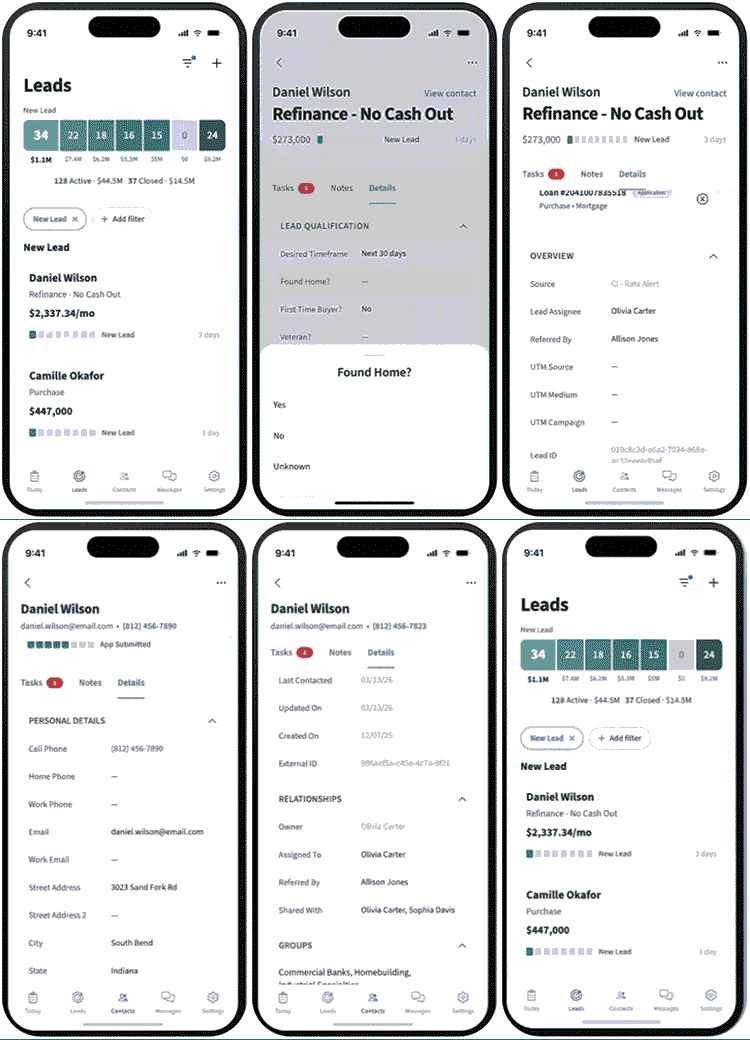
- Edit Contacts and Leads: LOs can now edit contact and lead records directly from the mobile app. Includes all standard fields and custom fields created in the admin console.
- Mobile UX Refinements: Edit Contact and Edit Lead screens redesigned for clarity and mobile-first workflows. Includes quick actions for Note, Outcome, and SMS directly from the mobile pipeline view.
- Loan Association: Link and manage loan associations directly from the lead details view on mobile, matching desktop capabilities. Unlink loans as needed to keep records accurate.
Availability
- Audience: Orgs with Lead Management, Engage SMS, and the mobile app.
- Status: Generally Available upon app store release
How to get started
- Mobile app users should update to the latest version (7.1.0+) from their app store to access edit functionality.
- Mobile App: Edit Contacts & Leads
- Mobile App Feature Summary
AI Assistants: Calendar & Appointment Scheduling
Why it matters
Building on August's launch of the AI Scenario Assistant and AI SMS Assistant, September extends both assistants further into the borrower conversation. Scheduling a follow-up has always meant stepping outside the conversation — checking a calendar, coordinating back and forth. Now the assistant handles it without the LO or the contact ever leaving the engagement.
What's new
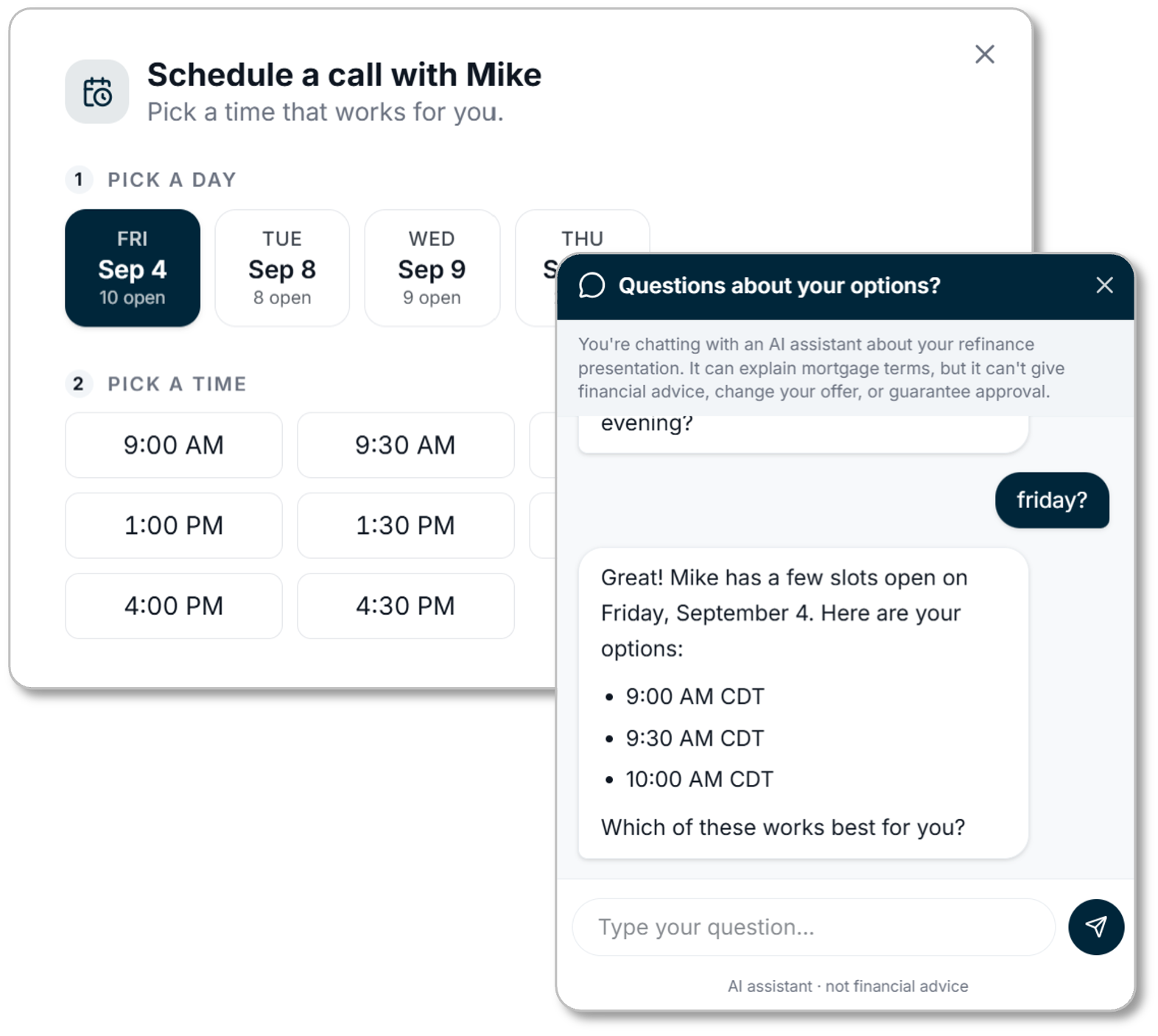
- Both AI assistants can now check an LO's Outlook/Office 365 calendar and book appointments directly.
- AI SMS Assistant can book directly within SMS conversations.
- AI Scenario Assistant can book through the customer presentation page via a booking interface or in the consumer chat box.
Availability
- Audience: Loan Officers and Admins using the AI Scenario Assistant or AI SMS Assistant.
- Requires: Active Office 365 connection.
- Status: Generally Available
How to get started
Email Builder: Locked Blocks
Why it matters
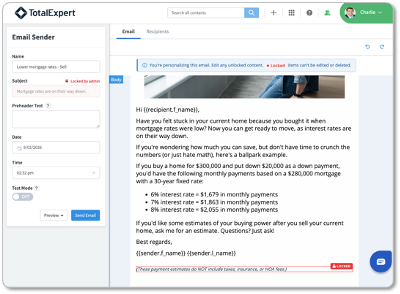
Loan officers often send email directly to contacts on the fly, customizing messages for their specific situation. Without guardrails, they risk accidentally removing compliance-critical content (disclosures, signatures, required disclaimers) that must appear in every email. Locked Blocks let admins enable direct email editing while ensuring mandatory content stays protected.
What's new
- Lock Email Template Blocks: Admins can now lock any block in an email template. Locked blocks remain visible to LOs but cannot be deleted, ensuring compliance-critical content stays in every email regardless of LO customization.
Availability
- Audience: Admins who manage email templates; Loan Officers with email editing access.
- Status: Generally Available. Available automatically to all orgs upon release.
How to get started
- Admins should review existing email templates and identify blocks containing compliance-critical content (signatures, disclosures, required footers) and lock them. Once locked, LOs can customize the rest of the template with confidence.
- Admin Guide - Email Builder Locking
AI Data Assistant
Why it matters
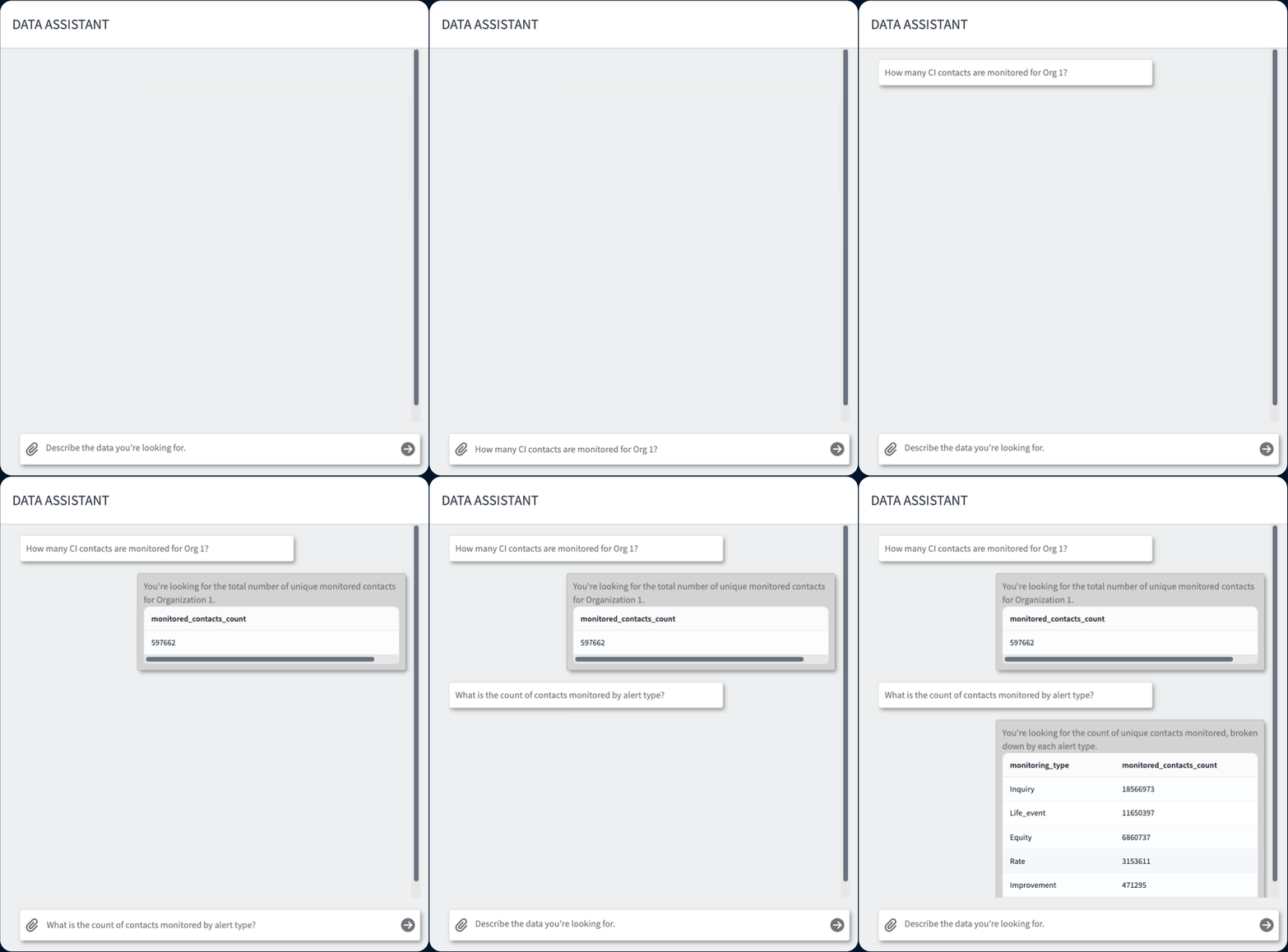
Admins have historically had to file custom reporting requests or wait on BI tooling to get answers to everyday data questions. AI Data Assistant removes that bottleneck. Admins can now ask questions about their enrichment and insights data in plain language and get instant analysis, without needing report-building expertise or a ticket to another team.
What's new
- Natural-language querying: Admins can ask questions about their Enrichment & Insights (formerly known as Customer Intelligence) data in plain English and receive instant analytics, trends, and insights.
Availability
- Audience: Admins at organizations leveraging Enrichment & Insights (Customer Intelligence)
- Status: Available by request
How to get started
- Contact your CSM to enable AI Data Assistant for your organization.
Bi-Directional Task Sync: Salesforce Integration & Task API
Why it matters
Loan officers and admins running Total Expert alongside Salesforce need Tasks to stay in sync automatically, and downstream tools like Journeys and AI Sales Assistant need a reliable way to create and manage Tasks on contact records. This release adds a full Tasks API and bidirectional Total Expert↔Salesforce Task sync, closing a longstanding gap where Tasks could only be managed through the Total Expert web UI.
What's new
- Task API for External Systems: Three new REST endpoints (POST, PATCH, DELETE) enable external integrations and third-party systems to programmatically create, update, and delete tasks on Total Expert contact records. Supports full field mapping including title, notes, due date, assignment, and completion status.
- Salesforce ↔ Total Expert Sync: Tasks created in Total Expert automatically sync to Salesforce. Saved mappings drive automatic sync of Task creates, updates, completions, and deletions in both directions.
- Task Assignment Control: Tasks can be assigned to specific team members (e.g., LOAs) rather than only to the originating loan officer, with Salesforce assignment reflecting the actual assignee.
Availability
- Audience: Loan Officers, Admins, and integration partners.
- Requires: TE4SF connection for Salesforce sync.
- Status: Available by request
How to get started
- API reference documentation: developer.totalexpert.com (Tasks API)
- TE4SF admins: configure Task field mappings in the existing data mapping step within your Salesforce connection settings
- Requires integration configuration. Contact your CSM to begin setup. An implementation services engagement is required.
New MLS Network Additions
Why it matters
MLS integrations expand loan officer access to real-time listing data, enabling smarter lead targeting and more relevant outreach timing. In September, we've onboarded seven new Multiple Listing Services to the Total Expert platform.
What's new
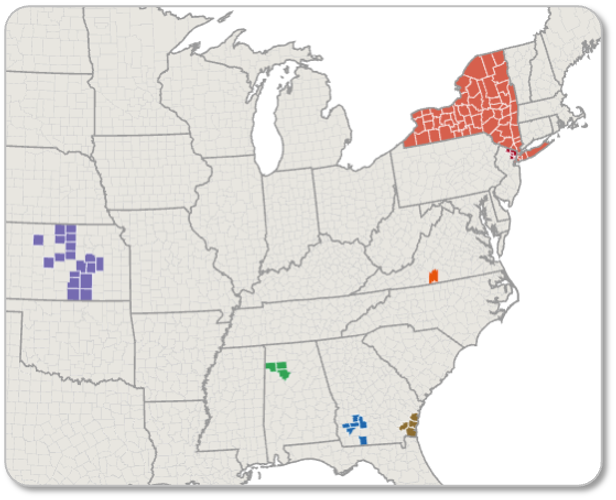
- Seven New MLSs Now Available:
- Albany Board of REALTORS (GA)
- Dan River Region Association of Realtors (VA)
- Walker Area Association of Realtors (AL)
- Mid-Kansas MLS/Prairie Land REALTORS (KS)
- South Central Kansas MLS (KS)
- MyState MLS (NY)
- New Jersey MLS (NJ)
- Scout MLS (GA)
Availability
- Audience: Loan Officers at organizations with MLS integrations enabled in their respective service areas.
- Status: Generally Available upon enablement
How to get started
- Loan officers can configure their MLS Agent ID in their account settings under MLS/IDX Settings to view listings in their market.
Expert Content
Why it matters
Expert Content provides ongoing value by giving marketing teams and loan officers ready-to-deploy assets that keep them in front of consumers at the right moments; from the earliest stages of consideration to post-close relationship nurturing.
What's new
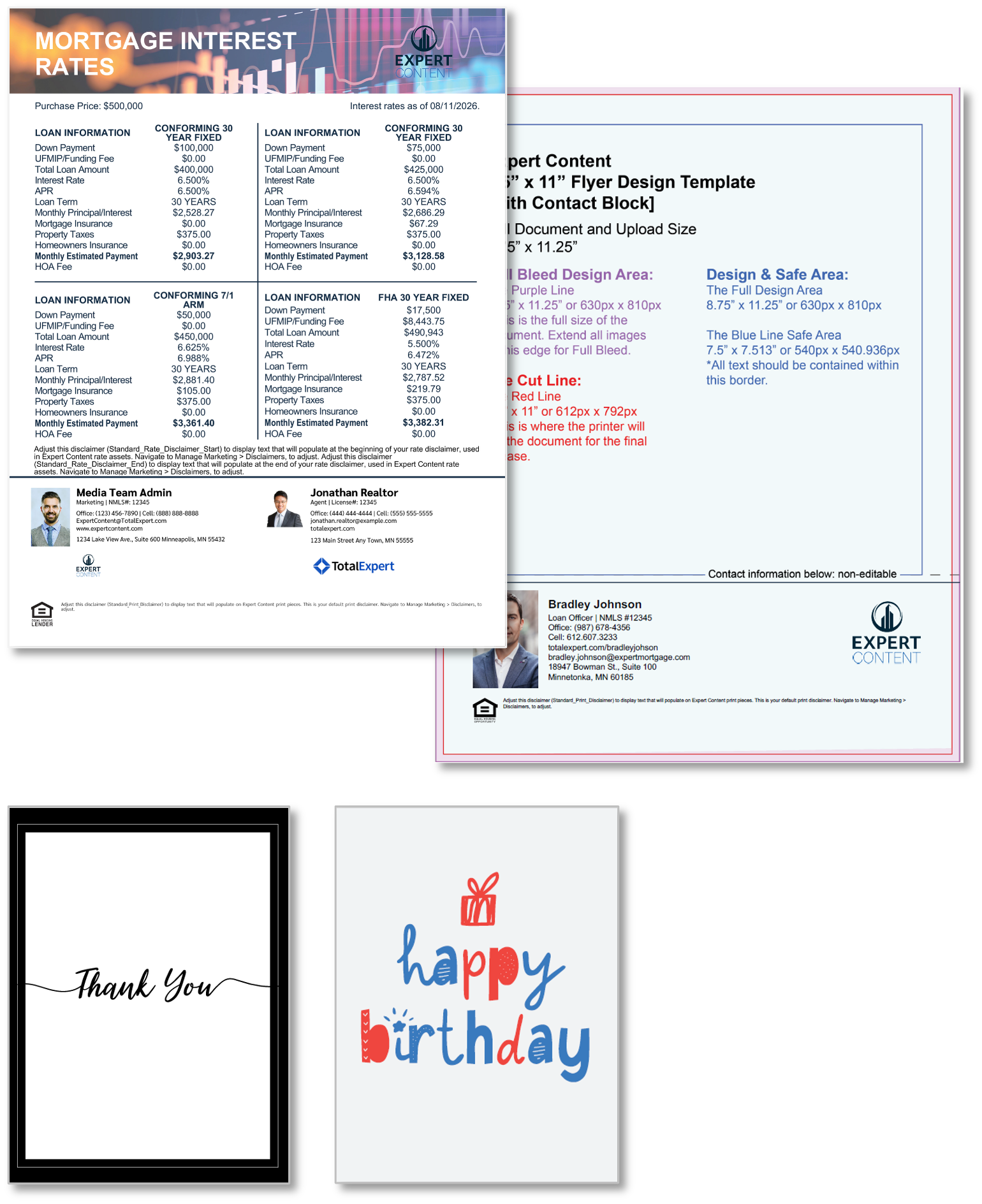
- Co-branded Rate-Only Flyers + Rate Flyer Enhancements
Co-branded variations of the two existing rate flyers for both PPE-integrated and editable options will be published to your library.
In addition to these two new flyers, enhancements have been made to include Purchase Price on these designs as well as allowing admins to configure their preferred brand logo. To apply this new logo configuration, simply copy and paste the logo toggle from the two new co-branded flyers into any of the existing rate-only flyers found here.
- New Single and Co-branded Flyer Footers
Expert Content has refreshed the default flyer footers to improve alignment, increase headshot sizing, and allow more space for company logos. If you are interested in replacing your current flyer footer designs with the new Expert Content footers, submit a custom content request to apply them across your flyer library. These requests are non-billable and follow the standard 7-10 business day SLA.
- Thank You and Birthday Greeting Card
New greeting card designs have been published to your library for print and ship/bulk ordering only. They are intended for users to handwrite greetings and hand address before mailing. There are two designs for each greeting, Thank You and Birthday, created in two sizes and both horizontal and vertical orientations. There are configuration toggles including brand color, logo, and the ability to override the default greetings (if the greeting is not part of the design elements). Admins can also allow end user editability of certain elements.
Availability
- Audience: Marketing admins and Loan Officers using Expert Content
- Status: Available as part of the current quarterly Expert Content plan
Small Changes. Big Impact.
Why it matters
The following improvements are driven directly by customer feedback and internal learnings. They sharpen the day-to-day experience across APIs, integrations, and admin capabilities.
What's new
Lead Management
- Zapier Integration: Lead Management Custom Fields Support: Custom Fields on Lead Management are now supported in Zapier, enabling third-party automation workflows to read and write custom lead data. Zapier Integration FAQ
Mobile
- Android 16 Compatibility (API 36): Mobile app upgraded to target the latest Android SDK, ensuring compatibility with Android 16 devices and compliance with Google Play Store requirements. No user action required, available automatically upon app update.
Data
- Reporting Center: Opt-Out/Unsubscribe Report (Admins, Marketing Admins): A new pre-built report template in Reporting Center surfaces contacts who have opted out or unsubscribed, giving admins a self-serve way to pull this data without filing a custom reporting request.
- Data Extracts: Additional Data Included (Data/BI Teams, Technical Partners): Organizations receiving the "Contact Group Membership Snapshot" delta extract will now also receive the "Contract Group Dim." No action required; the additional file appears automatically in existing extract deliveries. Data Lake Extracts Data Dictionary
APIs & Integrations
- ODC Enhancements (Developers, Integration Admins): The Outbound Data Connector's Loan Response Workflow can now write values back to any loan participant's contact fields (borrower, co-borrower, attorney, or agent) not just the loan record itself, giving integration partners more flexible bi-directional data sync options. Phased rollout to existing customers on affected workflows (e.g., AI Sales Assistant).
- Home Equity Application URL Field (Importer, Developers/Admins): Admins can now bring a contact's Home Equity Application URL into Total Expert through the Importer and User API, under marketing user settings. Once populated, the field is usable immediately in the Outbound Data Connector (for example, to text the application link from the AI Sales Assistant).
Admin & Settings
- Campaign Optimization Settings (Admins): Admins can now configure rendering time and pre-send time settings for large campaign sends directly in the platform, reducing reliance on internal configuration requests for large-send organizations.
- Hide Journey Purposes (Admins): Admins can now hide specific journey purposes from users' journey lists via a new "Hide from Assigned Users" field on the Journey Purposes page, keeping background or internal-only journeys out of an LO's view.
Coming Soon
Watch for updates in upcoming Release Notes:
- Group Messaging for Mobile (LOs, Engage SMS clients): Brings desktop group messaging to the mobile app. LOs will be able to start and manage group SMS conversations with co-borrowers, agents, and other loan participants directly from their phone, with the same delivery status, opt-out handling, and unified conversation view available on desktop today.
- AI Sales Assistant Talk Track Expansion: Aged Pre-Approval and HELOC (LOs, Admins): Expands the AI Sales Assistant with new talk tracks for aged pre-approvals and HELOC opportunities, enabling AI-driven outreach to a broader pipeline segment.
- Email Builder: Locked Blocks V2: Additional Lock States (Admins, LOs): Adds an editable-but-undeletable state so admins can mark blocks as customizable but not removable, letting LOs personalize content without deleting required sections.
- Configurable Default Landing Page: Admins will be able to set Pipeline View/Contact Lists as the default landing page for their organization, so loan officers land on the page they actively use from the moment they log in. The setting will apply org-wide immediately, with no logout/login required.
- Most Recent Lender: Appends public Home Purchase and Price Action data to contact records, surfacing the most recent lender relationship for targeted outreach.
- Distribution & Branch/Team Manager Routing: Expands routing engine to support branch- and team-manager-scoped rules, giving organizations with complex team structures more precise control over how inbound leads are distributed.